
PINT A-NZ Self-billing BIS
OpenPEPPOL AISBL, Post-Award Coordinating Community Version 1.1.4
Link to main site of documentation
Introduction
This Peppol Business Interoperability Specification (BIS) is concerned with clarifying requirements for ensuring interoperability, and provides a set of specifications for implementing a self-billing business process. It is based on the Peppol International (PINT) Invoice framework, and includes localisations to support Australian and New Zealand business and legal requirements.
Any instance of Value Added Tax (VAT) or Consumption Tax (CT) should be read to mean Goods and Services Tax (GST) in the A-NZ context.
The purpose of this document is to describe the use of the Self-billed invoice and Self-billed credit note messages in Peppol, and to facilitate efficient implementation and increased use of electronic collaboration in the self-billing process based on these formats.
Document Structure
This document is structured as follows:
-
Chapter 1 provides general information on the business processes, requirements, and functionalities.
-
Chapter 2 provides information on business-related requirements supported by the Self-billed invoice.
-
Chapter 3 provides information on legal and tax-related requirements supported by the Self-billed invoice.
-
Chapter 4 provides information about rules and calculations that apply to the Self-billed invoice content.
-
Chapter 5.1 describes the BIS identifiers.
-
Chapter 5.2 describes the semantic data types.
-
Chapter 5.3 provides external links to the relevant UBL schemas.
Scope
This document clarifies requirements for ensuring interoperability and provides guidelines for the support and implementation of these requirements. It provides detailed implementation guidelines for the Self-billed invoice and Self-billed credit note transactions.
Audience
The audience for this document comprises organisations wishing to become Peppol-enabled for exchanging electronic Self-billed invoices and Self-billed credit notes, and/or their ICT suppliers. These organisations may include:
-
Service providers
-
Contracting Authorities (CA)
-
Economic Operators (EO)
-
Software developers
More specifically, the following roles are addressed:
-
ICT architects
-
ICT developers
-
Business experts
For further information on Peppol/OpenPEPPOL, see http://peppol.org
Benefits
The Self-billed invoice and Self-billed credit note provide straightforward support for invoicing scenarios where a Self-billed credit note is required in addition to a Self-billed invoice. Other potential benefits include, but are not limited to:
-
Can be mandated as a basis for national or regional eInvoicing initiatives.
-
Procurement agencies can use these as a basis for moving all Self-billed invoices and Self-billed credit notes into electronic form. The flexibility of the specifications allows suppliers to gradually automate Self-billed invoice processing based on different sets of identifiers or references, following a cost–benefit approach.
-
SMEs can offer their trading partners the option of exchanging standardised documents in a uniform manner, thereby moving all Self-billed invoices and Self-billed credit notes into electronic form.
-
Large companies can implement these transactions as standardised documents for general operations and implement custom-designed bilateral connections for large trading partners.
-
Supports customers with a need for more complex interactions.
-
Can be used as a basis for restructuring in-house Self-billed invoice processes.
-
Significant savings can be realised by procuring agencies through the automation and streamlining of in-house processing. Accounting can be significantly automated, approval processes simplified and streamlined, payment scheduling improved, and auditing automated.
1. Business Processes
1.1. Parties and Roles
The diagram below illustrates the roles involved in the Self-billed invoice and Self-billed credit note transactions. The supplier and the Self-billed invoice receiver are the same entity, as are the customer and the Self-billed invoice sender.

1.1.1. Parties
- Customer
-
The customer is the legal person or organisation that demands a product or service. Examples of customer roles include buyer, consignee, debtor, and contracting authority.
- Supplier
-
The supplier is the legal person or organisation that provides a product or service.
1.1.2. Roles
- Creditor
-
The party to whom a debt is owed. This is the party that claims payment and is responsible for resolving billing issues and arranging settlement. It is the party that receives the Self-billed invoice or Self-billed credit note. Also known as the Self-billed invoice receiver, accounts receivable, or seller.
- Debtor
-
The party that owes a debt. This is the party responsible for making settlement relating to a purchase and that sends the Self-billed invoice or Self-billed credit note. Also known as the Self-billed invoice sender, accounts payable, or buyer.
1.2. PINT Self-billing Process
The Self-billed invoicing process includes issuing and sending the Self-billed invoice and the Self-billed credit note from the customer to the supplier, as well as the reception and handling of these documents at the supplier’s site.
The self-billing process is illustrated in the following workflow:
-
A customer issues a Self-billed invoice in the supplier’s name and sends it to the supplier. The Self-billed invoice refers to the supplier’s goods or services that have been consumed by the customer, based on the customer’s own records.
A Self-billed invoice may also refer to a contract or a framework agreement. The Self-billed invoice may specify articles (goods and services) using an article number or an article description.
-
The customer raises the Self-billed invoice in the supplier’s name and processes it as a purchase Self-billed invoice, as if it had been received from the supplier.
-
The customer records the Self-billed invoice as a purchase.
-
The customer records the Self-billed invoice as accounts payable.
-
-
The supplier receives the Self-billed invoice and processes it as revenue in the sales control system, leading to one of the following outcomes:
-
The supplier fully approves the Self-billed invoice, posts it in the accounting system as revenue and accounts receivable.
-
The supplier completely rejects the Self-billed invoice, contacts the buyer, and requests a Self-billed credit note.
-
The supplier disputes parts of the Self-billed invoice, contacts the buyer, and requests a Self-billed credit note and/or a new Self-billed invoice.
-
The diagram below shows the basic self-billing process using this Peppol BIS profile. This process assumes that both the Self-billed invoice and the Self-billed credit note are exchanged electronically.
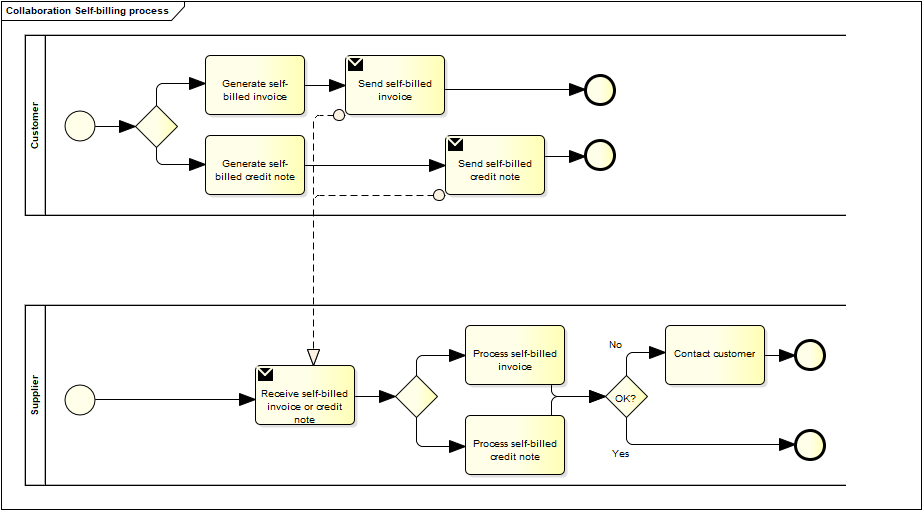
This profile covers the following Self-billed invoice processes:
| P1 |
Invoicing deliveries of goods and services against purchase orders, based on a contract |
| P2 |
Invoicing deliveries of goods and services based on a contract |
| P3 |
Invoicing the delivery of an incidental purchase order |
| P4 |
Pre-payment |
| P5 |
Spot payment |
| P6 |
Payment in advance of delivery |
| P7 |
Self-billed invoices with references to a despatch advice |
| P8 |
Self-billed invoices with references to a despatch advice and a receipt advice |
| P9 |
Self-billed credit notes or Self-billed invoices with negative amounts, issued for a variety of reasons, including the return of empty packaging |
1.3. Self-billed Invoice Functionality
A Self-billed invoice may support functions related to several (internal) business processes. This Peppol BIS supports the following functions:
-
Accounting
-
Self-billed invoice verification against the contract, the purchase order, and the goods and services delivered
-
Tax reporting
-
Auditing
-
Payment
In the following chapters, an assessment is made of which information is required for each of the functions listed above and whether it is in scope or out of scope for this Peppol BIS.
Explicit support for the following functions (not limited to these) is out of scope:
-
Inventory management
-
Delivery processes
-
Customs clearance
-
Marketing
-
Reporting
1.3.1. Accounting
Recording a business transaction in the financial accounts of an organisation is one of the main objectives of the Self-billed invoice. According to financial accounting best practices and tax rules, every taxable person shall keep accounts in sufficient detail to enable tax to be applied and its application to be checked by the tax authorities. For this reason, a Self-billed invoice shall provide information at both document and line level that enables booking on both the debit and the credit side.
1.3.2. Self-billed Invoice Verification
This process forms part of the seller’s internal business controls. The Self-billed invoice shall refer to an authentic commercial transaction. Support for Self-billed invoice verification is a key function of a Self-billed invoice. The Self-billed invoice should provide sufficient information to enable lookup of relevant existing documentation, whether electronic or paper-based, for example, as applicable:
-
the relevant purchase order
-
the contract
-
the call for tenders that formed the basis for the contract
-
the buyer’s reference
-
the confirmed receipt of the goods or services
-
delivery information
A Self-billed invoice should also contain sufficient information to allow the received Self-billed invoice to be routed to a responsible authority, person, or department for verification and approval.
1.3.3. Auditing
Companies may audit themselves as a means of internal control or be audited by external parties as part of a legal obligation. Accounting is a regular, ongoing process, whereas an audit is a separate review process to ensure that accounting has been carried out correctly. The auditing process places certain information requirements on a Self-billed invoice. These requirements are mainly related to enabling verification of the authenticity and integrity of the accounting transaction.
Self-billed invoices conformant with this PEPPOL BIS support the auditing process by providing sufficient information for:
-
identification of the relevant buyer and seller
-
identification of the products and services traded, including description, value, and quantity
-
information for connecting the Self-billed invoice to its payment
-
information for connecting the Self-billed invoice to relevant documents, such as a contract and a purchase order
1.3.4. Tax Reporting
The Self-billed invoice is used to convey tax-related information from the buyer to the seller, enabling both parties to correctly handle tax booking and reporting. A Self-billed invoice should contain sufficient information to allow the supplier and any auditor to determine whether the Self-billed invoice is correct from a tax perspective.
The Self-billed invoice shall enable determination of the tax regime, the calculation, and the description of the tax, in accordance with the relevant legislation.
1.3.5. Payment
A Self-billed invoice establishes an amount payable by the customer to the supplier. Issuance of a Self-billed invoice may occur either before or after payment is carried out. When a Self-billed invoice is issued before payment, it represents the customer’s acknowledgement of the goods or services received and of the amount it undertakes to pay. In such cases, the Self-billed invoice commonly contains the information required to settle that amount, unless that information has already been agreed in prior contracts or provided through separate payment instructions.
If a Self-billed invoice is issued after payment, such as in cases where the order process included payment instructions or where payment was made by credit card for online or telephone purchases, the Self-billed invoice may contain information about the payment made to facilitate reconciliation between the Self-billed invoice and the payment on the supplier’s side. A Self-billed invoice may also be partially paid before issuance, for example, when a pre-payment is made to confirm an order.
Self-billed invoices conformant with this specification should identify the means of payment for settlement of the Self-billed invoice and clearly state the payment amount due. They should provide the necessary details to support bank transfers. Payments by means of credit transfer, direct debit, and payment card are in scope.
1.4. Self-billed Invoices with negative amounts and Self-billed Credit Notes
Reversing a Self-billed invoice that has been issued and received can be done in two basic ways: by issuing a Self-billed credit note or by issuing a negative Self-billed invoice.
-
When crediting by means of a Self-billed credit note, the document type code is '261', and the Self-billed credit note quantities and extension or total amounts have the same sign (positive or negative) as the Self-billed invoice being cancelled or credited. The document type code acts as an indicator that the amounts are booked in reverse and cancel out the Self-billed invoice amounts.
-
When crediting by means of a negative Self-billed invoice, the document type code is '389', and the quantities and extension or total amounts have the opposite sign (negative versus positive) to those of the Self-billed invoice being cancelled or credited. It is the mathematical sign that indicates that, when booked, the amounts cancel out the original amounts. The Price Amount shall always be positive.
A Self-billed credit note may include negative amounts when cancelling a Self-billed invoice that itself contains negative line items or amounts.
1.5. Local use
The following sections describe how the PINT A-NZ Self-billing specification is applied to support local business processes.
1.5.1. Document Type
This specification uses the UBL 2.1 Invoice document as the base schema, and uses a subset of the document name code UN/CEFACT Code list 1001, D.16B with the following allowed values: for cbc:InvoiceTypeCode (ibt-003) or cbc:CreditNoteTypeCode (ibt-003):
-
389 Self-billed invoice (subset: Invoice Type Code)
-
261 Self-billed credit note (subset: Credit Note Type Code)
<cbc:InvoiceTypeCode>389</cbc:InvoiceTypeCode>1.5.2. Adjustment
After a self-billed invoice is sent, it is sometimes necessary to adjust the information. For example, an adjustment may be needed when:
-
There is an error in the relevant self-billed invoice. For example, the original self-billed invoice had a wrong date or an incorrect amount was charged; or
-
The amount of the original self-billed invoice no longer reflects the amount the buyer owes, for example due to items being returned or a dispute about items provided; or
-
The supply becomes taxable or stops being taxable.
1.5.3. Negative Self-billed Invoices and Self-billed Credit Notes
The PINT self-billing specification describes two different approaches to reversing, adjusting or correcting previous self-billed invoices, i.e. by using a self-billed credit note (where correcting quantities are positive) or using a self-billed negative invoice (where the same quantities would be negative).
A self-billed invoice or self-billed credit note may contain both positive and negative lines, summing to either a positive or negative document total.
Self-billed credit notes and negative self-billed invoices may also be known as adjustment notes in Australia or supply corrections in NZ.
In Australia, adjustment notes have specific requirements.
In NZ, requirements can be found at:
Supply correction information.
The free text notes field can be used to meet the relevant legislative requirements when correcting prior self-billed invoices.
2. Business information
In the subchapters below you find description of selected parts of the transaction.
2.1. Parties
The following roles may be specified. The same actor may assume more than one role, depending on the handling scenario.
Further details on the roles and actors can be found in Roles.
2.1.1. Seller (AccountingSupplierParty)
Seller information is mandatory and is provided in the element cac:AccountingSupplierParty.
<cac:AccountingSupplierParty>
    <cac:Party>
        <cbc:EndpointID schemeID="0151">65631636556</cbc:EndpointID> (1)
        <cac:PartyIdentification>
            <cbc:ID schemeID="0151">65631636556</cbc:ID> (2)
        </cac:PartyIdentification>
        <cac:PartyName>
            <cbc:Name>Supplier Trading Name Ltd</cbc:Name> (3)
        </cac:PartyName>
        <cac:PostalAddress>
            <cbc:StreetName>Main street 1</cbc:StreetName>
            <cbc:CityName>Harrison</cbc:CityName>
            <cbc:PostalZone>2912</cbc:PostalZone>
            <cac:Country>
                <cbc:IdentificationCode>AU</cbc:IdentificationCode> (4)
            </cac:Country>
        </cac:PostalAddress>
        <cac:PartyTaxScheme>
            <cbc:CompanyID>65631636556001</cbc:CompanyID> (5)
            <cac:TaxScheme>
                <cbc:ID>GST</cbc:ID> (6)
            </cac:TaxScheme>
        </cac:PartyTaxScheme>
        <cac:PartyLegalEntity>
            <cbc:RegistrationName>Supplier Official Name Ltd</cbc:RegistrationName> (7)
            <cbc:CompanyID schemeID="0151">47555222000</cbc:CompanyID> (8)
            <cbc:CompanyLegalForm>Private Limited Company</cbc:CompanyLegalForm>
        </cac:PartyLegalEntity>
        <cac:Contact> (9)
            <cbc:Name>John Doe</cbc:Name>
            <cbc:Telephone>9384203984</cbc:Telephone>
            <cbc:ElectronicMail>john.doe@foo.bar</cbc:ElectronicMail>
        </cac:Contact>
    </cac:Party>
</cac:AccountingSupplierParty>| 1 | Seller electronic address (ibt-034), mandatory. The identification scheme identifier shall be selected from the Electronic Address Scheme (EAS) list. |
| 2 | Seller identifier (ibt-029). If used, the identification scheme identifier shall be selected from the entries published by the ISO/IEC 6523 maintenance agency. |
| 3 | Seller’s trading name (ibt-028). |
| 4 | Seller’s country code (ibt-040). |
| 5 | Seller tax registration ID (ibt-031). |
| 6 | Tax scheme for the seller’s tax registration. Use the appropriate code for the seller’s jurisdiction, such as VAT or GST. |
| 7 | Seller legal registered name (ibt-027). |
| 8 | Seller legal registration identifier (ibt-030). If used, the identification scheme identifier shall be selected from the entries published by the ISO/IEC 6523 maintenance agency. |
| 9 | Seller contact (ibg-06). |
2.1.2. Buyer (AccountingCustomerParty)
Buyer information is mandatory and is provided in the element cac:AccountingCustomerParty.
<cac:AccountingCustomerParty>
    <cac:Party>
        <cbc:EndpointID schemeID="0151">46610678455</cbc:EndpointID> (1)
        <cac:PartyIdentification>
            <cbc:ID schemeID="0151">46610678455</cbc:ID> (2)
        </cac:PartyIdentification>
        <cac:PartyName>
            <cbc:Name>Trotters Trading Co Ltd</cbc:Name> (3)
        </cac:PartyName>
        <cac:PostalAddress>
            <cbc:StreetName>100 Queen Street</cbc:StreetName>
            <cbc:CityName>Sydney</cbc:CityName>
            <cbc:PostalZone>2000</cbc:PostalZone>
            <cac:Country>
                <cbc:IdentificationCode>AU</cbc:IdentificationCode> (4)
            </cac:Country>
        </cac:PostalAddress>
        <cac:PartyTaxScheme>
            <cbc:CompanyID>46610678455</cbc:CompanyID> (5)
            <cac:TaxScheme>
                <cbc:ID>GST</cbc:ID> (6)
            </cac:TaxScheme>
        </cac:PartyTaxScheme>
        <cac:PartyLegalEntity>
            <cbc:RegistrationName>Buyer Official Name</cbc:RegistrationName> (7)
            <cbc:CompanyID schemeID="0151">91888222000</cbc:CompanyID> (8)
        </cac:PartyLegalEntity>
        <cac:Contact> (9)
            <cbc:Name>Lisa Johnson</cbc:Name>
            <cbc:Telephone>23434234</cbc:Telephone>
            <cbc:ElectronicMail>lj@buyer.com.au</cbc:ElectronicMail>
        </cac:Contact>
    </cac:Party>
</cac:AccountingCustomerParty>| 1 | Buyer electronic address (ibt-049), mandatory. The identification scheme identifier shall be selected from the Electronic Address Scheme (EAS) list. |
| 2 | Buyer identifier (ibt-046). If used, the identification scheme identifier shall be selected from the entries published by the ISO/IEC 6523 maintenance agency. |
| 3 | Buyer trading name (ibt-045). |
| 4 | Buyer country code (ibt-055), mandatory. |
| 5 | Buyer tax registration ID (ibt-048). |
| 6 | Tax scheme for the buyer tax registration. Use the appropriate code for the buyer’s jurisdiction, such as VAT or GST. |
| 7 | Buyer legal registered name (ibt-044). |
| 8 | Buyer legal registration identifier (ibt-047). If used, the identification scheme identifier shall be selected from the entries published by the ISO/IEC 6523 maintenance agency. |
| 9 | Buyer contact (ibg-09). |
2.1.3. Payment Receiver (PayeeParty)
Payment receiver information is optional. If this information is not provided, the seller is assumed to be the payment receiver. When payee information is provided, it indicates that a factoring arrangement is being documented.
To reflect the assignment of a Self-billed invoice to a factor, the following is required:
-
A disclaimer (notification notice) on the Self-billed invoice stating that the Self-billed invoice has been assigned to a factor. The disclaimer should be provided using the Invoice note (IBT-22) at document level.
-
Identification of the factor as the payee.
-
Updating the bank account to be in favour of the factor.
<cac:PayeeParty>
    <cac:PartyIdentification>
        <cbc:ID schemeID="0151">46610678455</cbc:ID> (1)
    </cac:PartyIdentification>
    <cac:PartyName>
        <cbc:Name>Payee party</cbc:Name>
    </cac:PartyName>
    <cac:PartyLegalEntity>
        <cbc:CompanyID schemeID="0151">46610678455</cbc:CompanyID> (2)
    </cac:PartyLegalEntity>
</cac:PayeeParty>| 1 | The schemeID attribute is recommended for all party identifiers. |
| 2 | The schemeID attribute is recommended for party legal entity identifiers. |
2.1.4. Seller’s Tax Representative (TaxRepresentativeParty)
The seller’s tax representative is relevant when the seller delivers goods or services in a country where the seller does not have a permanent establishment. In such cases, information about the tax representative shall be included in the Self-billed invoice.
<cac:TaxRepresentativeParty>
    <cac:PartyName>
        <cbc:Name>Mr Wilson</cbc:Name>
    </cac:PartyName>
    <cac:PostalAddress>
        <cbc:StreetName>PO Box 878</cbc:StreetName>
        <cbc:CityName>Sydney</cbc:CityName>
        <cbc:PostalZone>2000</cbc:PostalZone>
        <cbc:CountrySubentity>NSW</cbc:CountrySubentity>
        <cac:AddressLine>
            <cbc:Line>Unit 1</cbc:Line>
        </cac:AddressLine>
        <cac:Country>
            <cbc:IdentificationCode>AU</cbc:IdentificationCode>
        </cac:Country>
    </cac:PostalAddress>
    <cac:PartyTaxScheme>
        <cbc:CompanyID>TaxRegistrationID</cbc:CompanyID> (1)
        <cac:TaxScheme>
            <cbc:ID>GST</cbc:ID>
        </cac:TaxScheme>
    </cac:PartyTaxScheme>
</cac:TaxRepresentativeParty>| 1 | Tax identifier of the seller’s tax representative (ibt-063) |
2.2. Delivery Details (Date and Location)
Delivery details may be provided at the document level.
The place and date of delivery are recommended and should be provided unless their absence does not affect the ability to ensure the correctness of the Self-billed invoice.
The delivery element contains information on the name, address, and delivery location identifier (cac:Delivery/cac:DeliveryLocation/cbc:ID), which may be used when the place of delivery is defined through an identifier, for example, a GLN (Global Location Number) issued by GS1.
<cac:Delivery>
    <cbc:ActualDeliveryDate>2019-07-01</cbc:ActualDeliveryDate>
    <cac:DeliveryLocation>
        <cbc:ID schemeID="0151">46610678455</cbc:ID>
        <cac:Address> (1)
            <cbc:StreetName>Delivery street 2</cbc:StreetName>
            <cbc:AdditionalStreetName>Building 56</cbc:AdditionalStreetName>
            <cbc:CityName>Sydney</cbc:CityName>
            <cbc:PostalZone>2000</cbc:PostalZone>
            <cbc:CountrySubentity>NSW</cbc:CountrySubentity>
            <cac:AddressLine>
                <cbc:Line>Unit 1</cbc:Line>
            </cac:AddressLine>
            <cac:Country>
                <cbc:IdentificationCode>AU</cbc:IdentificationCode> (2)
            </cac:Country>
        </cac:Address>
    </cac:DeliveryLocation>
    <cac:DeliveryParty> (3)
        <cac:PartyName>
            <cbc:Name>Delivery party Name</cbc:Name>
        </cac:PartyName>
    </cac:DeliveryParty>
</cac:Delivery>| 1 | Deliver-to address (ibg-15), the address to which the invoiced goods and services were or are delivered. |
| 2 | Deliver-to country code (ibt-080), mandatory. |
| 3 | Deliver-to party name (ibt-070), the name of the party to which the goods and services are delivered. |
2.3. References and Attachments
Support for Self-billed invoice verification is a key function of a Self-billed invoice. The Self-billed invoice should provide sufficient information to enable lookup of relevant existing documentation, whether electronic or paper-based.
| Any reference element should contain valid information. If no reference is available, the element should not be present in the instance document. |
The Self-billed invoice and Self-billed credit note transactions support the following references to existing documentation:
2.3.1. Purchase Order and Sales Order Reference
The purchase order reference is a conditional business term. If the customer has issued a purchase order, it should be referenced by providing its identifier in the resulting Self-billed invoice; otherwise, the buyer reference should be used (see Buyer Reference).
If the purchase order is referenced at the Self-billed invoice header level, the order reference element at line level can be used to state the relevant line numbers in the order.
A sales order is issued by the seller to confirm the sale of specified products and may be provided in the Self-billed invoice.
| In a Self-billed invoice, both a purchase order and a sales order reference may be provided. However, a Self-billed invoice instance cannot reference a sales order without also providing the corresponding purchase order reference. |
<cac:OrderReference>
    <cbc:ID>o-998877</cbc:ID> (1)
    <cbc:SalesOrderID>so-12343</cbc:SalesOrderID> (2)
</cac:OrderReference>| 1 | Purchase order reference |
| 2 | Sales order reference |
2.3.2. Buyer Reference
The buyer reference, known as "Your ref", is conditional. A Self-billed invoice shall contain either a buyer reference or an order reference (see Purchase Order and Sales Order Reference).
This element is used to identify who ordered the products or services. Examples include the name of the person placing the order, an employee number, or a code identifying the relevant person, department, or group. "Your ref" is often used for internal routing at the recipient, and it is therefore important to populate this element with correct values according to the recipient’s needs.
If no reference to an order is available, the customer may supply, in the buyer reference, the name of the person who ordered the products or services or the person appointed by the customer for this purpose.
| When the customer maintains such a reference, the corresponding element shall contain that reference. |
<cbc:BuyerReference>0150abc</cbc:BuyerReference>2.3.3. Invoiced Object Identifier
The invoiced object identifier identifies the object on which the Self-billed invoice is based and is provided by the seller. Examples include a subscription number, telephone number, meter point, vehicle, or person, as applicable.
If it is not clear to the receiver which scheme is used for the identifier, an optional scheme identifier attribute should be used and shall be selected from the invoiced object identifier scheme code list.
The invoiced object reference is provided using the element cac:AdditionalDocumentReference with the document type code set to 130.
<cac:AdditionalDocumentReference>
    <cbc:ID schemeID="ABT">DR35141</cbc:ID>  (1) (2)
    <cbc:DocumentTypeCode>130</cbc:DocumentTypeCode> (3)
</cac:AdditionalDocumentReference>| 1 | The Self-billed invoice object identifier scheme is given as an attribute on the identifier. It states the type of the identifier according to the UN/CEFACT 1153 code list. |
| 2 | An identifier of the object to which the Self-billed invoice relates. |
| 3 | A code that qualifies the identifier as an invoiced object identifier. Document type code "130" provides this qualification. |
2.3.4. Contract Reference
To reference or match a Self-billed invoice to a purchase contract, the contract number may be specified as follows:
<cac:ContractDocumentReference>
    <cbc:ID>framework no 1</cbc:ID>
</cac:ContractDocumentReference>
2.3.5. Despatch and Receipt Advice References
Document Level
To reference or match a Self-billed invoice to a despatch or receipt advice, use the following elements:
<cac:DespatchDocumentReference>
    <cbc:ID>despadv-3</cbc:ID> (1)
</cac:DespatchDocumentReference>
<cac:ReceiptDocumentReference>
    <cbc:ID>resadv-1</cbc:ID> (2)
</cac:ReceiptDocumentReference>| 1 | Despatch advice |
| 2 | Receipt advice |
Line Level
When a Self-billed invoice charges items that have been delivered in separate despatches, the references shall be provided at line level as follows. If the invoiced quantity of an item has been delivered by more than one despatch, the Self-billed invoice shall contain separate lines for each despatch. When despatches are referenced at line level, no reference shall be provided at document level.
<cac:DespatchLineReference>
    <cbc:LineID>4</cbc:LineID>
    <cac:DocumentReference>
        <cbc:ID>despadv-3</cbc:ID> (1)
    </cac:DocumentReference>
</cac:DespatchLineReference>| 1 | Despatch advice |
2.3.6. Tender Reference
To identify the call for tender or lot to which the Self-billed invoice relates, use the OriginatorDocumentReference. In most cases, the identifier is the Procurement Procedure Identifier.
<cac:OriginatorDocumentReference>
    <cbc:ID>ppid-123</cbc:ID>
</cac:OriginatorDocumentReference>
2.3.7. Project Reference
The project reference is optional and is sent in a Self-billed invoice using the element cac:ProjectReference/cbc:ID. In a Self-billed credit note, this element does not exist; instead, the project reference is sent using the element cac:AdditionalDocumentReference[cbc:DocumentTypeCode='50']/cbc:ID.
- NOTE
-
When sending the project reference, only
cbc:IDandcbc:DocumentTypeCodeare allowed within thecac:AdditionalDocumentReferenceelement.
<cac:ProjectReference>
    <cbc:ID>project333</cbc:ID>
</cac:ProjectReference>
2.3.8. Preceding Self-billed Invoice References
A Self-billed credit note or a negative Self-billed invoice may refer to one or more preceding Self-billed invoices. This is done using business group BG-3 Preceding invoice reference, providing the Self-billed invoice number and issue date. The issue date shall be provided if the preceding invoice reference is not unique.
If a correction applies to a large number of Self-billed invoices, the invoicing period (BG-14), optionally combined with a clarifying Invoice note (IBT-22), may be provided at document level instead.
2.3.9. Attachments
A Self-billed invoice may include a supporting document for informational purposes. Examples of such documents include work reports, certificates, or other documents related to the purchase or the invoiced items. A supporting document may be attached to the Self-billed invoice in two ways: by providing a direct hyperlink from which the document can be downloaded, or by embedding the document within the Self-billed invoice. A compliant receiver is required to be able to receive an attached supporting document and, in the case of embedded files, to convert it into a file. However, the receiver is not required to process or interpret the content of that file, as it is provided for informational purposes only.
When attaching a document using a URI, the hyperlink shall point directly to the file to be downloaded.
An embedded document is included in the Self-billed invoice as a binary object using Base64 encoding and shall be supplemented with information about the document file name and a MIME code indicating the file type. This enables the receiver to convert the binary content into a file with the same name as the original and to associate it with an appropriate application for viewing. The set of allowed file type codes (MIME codes) is limited to types that can be opened using commonly available applications.
Where the applicable MIME code list permits XML attachments, and as with other file types, when an attached file is an XML file, the receiver is expected to be able to receive and convert the binary object into an XML file. However, the sender shall not expect the receiver to view or process the content of that XML file. Any further handling of an embedded XML file attachment is optional for the receiver.
<cac:AdditionalDocumentReference>
    <cbc:ID>ts12345</cbc:ID> (1)
    <cbc:DocumentDescription>Technical specification</cbc:DocumentDescription> (2)
    <cac:Attachment>
        <cac:ExternalReference>
            <cbc:URI>www.techspec.no</cbc:URI> (3)
        </cac:ExternalReference>
    </cac:Attachment>
</cac:AdditionalDocumentReference><cac:AdditionalDocumentReference>
<cbc:ID>mr4343</cbc:ID> (1)
<cbc:DocumentDescription>mileage report</cbc:DocumentDescription> (2)
<cac:Attachment>
<cbc:EmbeddedDocumentBinaryObject mimeCode="text/csv" filename="mileage.csv">bWlsYWdlIHJlcG9ydA==</cbc:EmbeddedDocumentBinaryObject> (4)
</cac:Attachment>
</cac:AdditionalDocumentReference>-
An identifier of the supporting document (ibt-122)
-
A description of the supporting document (ibt-123)
-
The URL (Uniform Resource Locator) identifying where the external document is located (ibt-124)
-
An attached document embedded as a binary object or sent together with the Self-billed invoice (ibt-125). The file type is specified using the
mimeCodeattribute (ibt-125-1), and the original file name is specified using thefilenameattribute (ibt-125-2).
Embedded document attachment
An attachment is expected to include complementary additional information of value to the seller (e.g. timesheet, trend data, detailed break-down of pricing/valuation, regulatory information, help and assistance etc.) in addition to the eInvoice. As stated in Binary Object, an attachment that is purely a copy of the data within the eInvoice XML message, with no additional information, is not in compliance with this specification.
Information in the attachment should align with data in the eInvoice XML message. If there are any differences, the eInvoice XML message data should be used.
The following values are allowed for @mimeCode:
-
Document: application/pdf
-
Image: image/png, image/jpeg
-
Cell structured: text/csv, application/vnd.openxmlformats-officedocument.spreadsheetml.sheet, application/vnd.oasis.opendocument.spreadsheet
2.4. Allowances and Charges
The Self-billed invoice and Self-billed credit note transactions include elements for allowances and charges at three levels.
The element cac:AllowanceCharge, with the sub-element cbc:ChargeIndicator, indicates whether the instance is a charge (true) or an allowance (false).
- The header level
-
Applies to the entire Self-billed invoice and is included in the calculation of the total Self-billed invoice amount.
-
Several allowances and charges may be supplied.
-
The specification of TAX for allowances and charges, using
cac:TaxCategorywith its sub-elements, shall be supplied. -
The sum of all allowances and charges at the header level shall be specified in
cbc:AllowanceTotalAmountandcbc:ChargeTotalAmount, respectively.
-
- The line level
-
Applies to the line level and is included in the calculation of the line amount.
-
Several allowances and charges may be supplied.
-
The specification of TAX for allowances and charges shall not be provided, as the TAX category stated for the Self-billed invoice line itself also applies to the allowances or charges on that line.
-
The sum of all allowances and charges at the line level shall be taken into account—subtracted or added—when calculating the line extension amount. These line-level allowances and charges shall not be included in the header-level elements.
-
- The line-level Price element
-
Provides information to the supplier on how the price is determined. It is also relevant if the seller or buyer wants to post the allowance in their accounting systems. The price itself shall always be the net price, i.e. the base amount reduced by a discount (allowance).
-
Only one occurrence of an allowance (discount) is allowed.
-
The specification of TAX for the allowance shall not be provided.
-
Allowances related to Price shall not be included in any other calculations.
-
Allowances related to Price may specify both the amount and the base amount.
-
<cac:AllowanceCharge>
    <cbc:ChargeIndicator>true</cbc:ChargeIndicator> (1)
    <cbc:AllowanceChargeReasonCode>FC</cbc:AllowanceChargeReasonCode>
    <cbc:AllowanceChargeReason>Freight service</cbc:AllowanceChargeReason>
    <cbc:MultiplierFactorNumeric>20</cbc:MultiplierFactorNumeric> (4)
    <cbc:Amount currencyID="AUD">200</cbc:Amount> (5)
    <cbc:BaseAmount currencyID="AUD">1000</cbc:BaseAmount> (3)
    <cac:TaxCategory>
        <cbc:ID>S</cbc:ID>
        <cbc:Percent>10</cbc:Percent>
        <cac:TaxScheme>
            <cbc:ID>GST</cbc:ID>
        </cac:TaxScheme>
    </cac:TaxCategory>
</cac:AllowanceCharge>
<cac:AllowanceCharge>
    <cbc:ChargeIndicator>false</cbc:ChargeIndicator> (2)
    <cbc:AllowanceChargeReasonCode>65</cbc:AllowanceChargeReasonCode>
    <cbc:AllowanceChargeReason>Production error discount</cbc:AllowanceChargeReason>
    <cbc:Amount currencyID="AUD">100</cbc:Amount>
    <cac:TaxCategory>
        <cbc:ID>S</cbc:ID>
        <cbc:Percent>10</cbc:Percent>
        <cac:TaxScheme>
            <cbc:ID>GST</cbc:ID>
        </cac:TaxScheme>
    </cac:TaxCategory>
</cac:AllowanceCharge>| 1 | ChargeIndicator = true to indicate a charge |
| 2 | ChargeIndicator = false to indicate an allowance |
| 3 | Base amount, to be used with the percentage to calculate the amount |
| 4 | Charge percentage |
| 5 | \$"Amount" = "Base amount" times ("Percentage" div 100)\$ |
<cac:AllowanceCharge>
    <cbc:ChargeIndicator>true</cbc:ChargeIndicator>
    <cbc:AllowanceChargeReasonCode>CG</cbc:AllowanceChargeReasonCode>
    <cbc:AllowanceChargeReason>Cleaning</cbc:AllowanceChargeReason>
    <cbc:MultiplierFactorNumeric>10</cbc:MultiplierFactorNumeric>
    <cbc:Amount currencyID="AUD">1</cbc:Amount>
    <cbc:BaseAmount currencyID="AUD">10</cbc:BaseAmount>
</cac:AllowanceCharge>
<cac:AllowanceCharge>
    <cbc:ChargeIndicator>false</cbc:ChargeIndicator>
    <cbc:AllowanceChargeReasonCode>95</cbc:AllowanceChargeReasonCode>
    <cbc:AllowanceChargeReason>Discount</cbc:AllowanceChargeReason>
    <cbc:Amount currencyID="AUD">100</cbc:Amount>
</cac:AllowanceCharge>
2.5. Payment Means Information
2.5.1. Credit Transfer
| Payment means code 30, as defined below, shall be supported by all receivers of a PINT-compliant Self-billed invoice. This payment method acts as the common denominator for global trade. |
If payment is made by credit transfer, the payment account identifier (IBT-84) is mandatory.
Examples of codes for payment by credit transfer are:
-
30 - Credit transfer
<cac:PaymentMeans>
    <cbc:PaymentMeansCode name="Credit transfer">30</cbc:PaymentMeansCode> (1)
    <cbc:PaymentID>93274234</cbc:PaymentID> (2)
    <cac:PayeeFinancialAccount>
        <cbc:ID>AccountNumber</cbc:ID> (3)
        <cbc:Name>AccountName</cbc:Name>
        <cac:FinancialInstitutionBranch>
            <cbc:ID>BSB Number</cbc:ID> (4)
        </cac:FinancialInstitutionBranch>
    </cac:PayeeFinancialAccount>
</cac:PaymentMeans>| 1 | Mandatory, payment means code for credit transfer |
| 2 | Remittance information |
| 3 | Mandatory, IBAN (in the case of a SEPA payment) or a national account number (BBAN) |
| 4 | BIC or a national clearing code |
2.5.2. Card Payment
If the buyer has opted to pay using a payment card, such as a credit or debit card, information on the Primary Account Number (PAN) shall be present in the Self-billed invoice.
Examples of codes for payment by card are:
-
48 - Bank card
-
54 - Credit card
-
55 - Debit card
<cac:PaymentMeans>
    <cbc:PaymentMeansCode name="Credit card">54</cbc:PaymentMeansCode> (1)
    <cbc:PaymentID>9387439</cbc:PaymentID>
    <cac:CardAccount>
        <cbc:PrimaryAccountNumberID>123236</cbc:PrimaryAccountNumberID> (2)
        <cbc:NetworkID>VISA</cbc:NetworkID> (3)
        <cbc:HolderName>Card holders name</cbc:HolderName> (4)
    </cac:CardAccount>
</cac:PaymentMeans>| 1 | Payment means code for credit card |
| 2 | Mandatory, shall be the last 4 to 6 digits of the payment card number |
| 3 | Mandatory, used to identify the financial service network provider of the card. Examples include VISA, MasterCard, and American Express. |
| 4 | Cardholder name |
2.5.3. Payment means usage in A-NZ
Peppol supports a range of payment means expressed by the element cbc:PaymentMeansCode (ibt-081) as per the payment means code list, which is based on the UNCL 4461 code list.
The code list currently does not include some of the frequently used payment methods in A-NZ (e.g. BPAY).
Businesses and service providers can refer to the payment means guidance note published by A-NZ authorities on how to manage payment methods that are not covered in the supported codes.
Australia
<cac:PaymentMeans>
    <cbc:PaymentMeansCode name="Credit transfer">30</cbc:PaymentMeansCode>
    <cbc:PaymentID>88827661226</cbc:PaymentID>
    <cac:PayeeFinancialAccount>
        <cbc:ID>324875423</cbc:ID> (1)
        <cbc:Name>ABC Ltd.</cbc:Name> (2)
        <cac:FinancialInstitutionBranch>
            <cbc:ID>205536</cbc:ID> (3)
        </cac:FinancialInstitutionBranch>
    </cac:PayeeFinancialAccount>
</cac:PaymentMeans>| 1 | Bank Account Number |
| 2 | Account Name |
| 3 | Bank State Branch |
In addition to credit transfer, a number of other payment methods are commonly used in Australia, which include but are not limited to BPAY, BPAY View, Post Billpay, and New Payment Platform based direct credit or debit payment methods such as OSKO.
Each payment method requires different supporting information, e.g. biller code and reference number for BPAY.
The payment means guidance note provides examples and specifies how the information should be conveyed in existing elements.
New Zealand
The most common payment method in New Zealand is direct credit transfer (Code 30 - "Credit Transfer").
A credit transfer is a payment where the account holder authorises the bank to pay a fixed or variable amount directly to a supplier’s bank account. These payments are commonly made using a Bank State Branch (BSB) and Account number.
In New Zealand, it is common business practice to provide the combined bank account details shown as a 16-digit number, e.g. 0205000632487000, which consists of:
-
a 6-digit bank/branch code;
-
a 7-digit bank account number; and
-
a 3-digit suffix.
<cac:PaymentMeans>
    <cbc:PaymentMeansCode name="Credit transfer">30</cbc:PaymentMeansCode>
    <cbc:PaymentID>88827661226</cbc:PaymentID>
    <cac:PayeeFinancialAccount>
        <cbc:ID>0205000632487000</cbc:ID> (1)
        <cbc:Name>ABC Ltd.</cbc:Name> (2)
    </cac:PayeeFinancialAccount>
</cac:PaymentMeans>| 1 | Combined NZ Bank/Branch/Account Number |
| 2 | Account name |
2.6. Payment Terms
If the optional cac:PaymentTerms (ibg-33) group is included, a single occurrence of cac:PaymentTerms/cbc:Note (ibt-020) must be included, although the semantic and syntax models might show the Payment terms cac:PaymentTerms/cbc:Note (ibt-020) is optional.
2.7. Item Information
2.7.1. Item Identifiers
In a Self-billed invoice line, the seller item identifier, the buyer item identifier, and the standard item identifier may be provided. For the seller’s and buyer’s item identifiers, no scheme attribute is used, whereas the schemeID is mandatory for the standard item identifier and must be selected from the ISO 6523 ICD list.
<cac:BuyersItemIdentification>
    <cbc:ID>b-13214</cbc:ID>
</cac:BuyersItemIdentification>
<cac:SellersItemIdentification>
    <cbc:ID>97iugug876</cbc:ID>
</cac:SellersItemIdentification>
<cac:StandardItemIdentification>
    <cbc:ID schemeID="0160">97iugug876</cbc:ID> (1)
</cac:StandardItemIdentification>| 1 | 0160 is the ICD value for a GTIN identifier |
2.7.2. Item Classification
Several different item classification codes may be provided per Self-billed invoice line. The codes shall be taken from one of the classification schemes listed in the UNCL7143 code list.
<cac:CommodityClassification>
    <cbc:ItemClassificationCode listID="STI">09348023</cbc:ItemClassificationCode> (1)
</cac:CommodityClassification>| 1 | listID must be from the UNCL7143 code list, and the code STI indicates that this is a CPV classification. |
<cac:CommodityClassification>
    <cbc:ItemClassificationCode listID="TST" listVersionID="19.05.01">86776</cbc:ItemClassificationCode> (1)
</cac:CommodityClassification>| 1 | listID must be from the UNCL7143 code list, and the code TST indicates that this is a UNSPSC classification. The listVersionID is optional but may be used to specify the version of UNSPSC. NOTE: In previous versions, the code MP was used as a temporary workaround to identify UNSPSC. In the Fall 2019 release, this was replaced with the new 7143 code TST, which is specific to UNSPSC. |
2.8. Price Information
A Self-billed invoice shall contain information about the item net price. Additional information, such as the gross price, item price base quantity, and price discount, may also be provided.
For details on price calculation, see Item Net Price (IBT-146).
<cac:Price>
    <cbc:PriceAmount currencyID="AUD">410</cbc:PriceAmount> (4)
    <cbc:BaseQuantity unitCode="H87">1</cbc:BaseQuantity> (3)
    <cac:AllowanceCharge>
        <cbc:ChargeIndicator>false</cbc:ChargeIndicator>
        <cbc:Amount currencyID="AUD">40</cbc:Amount> (2)
        <cbc:BaseAmount currencyID="AUD">450</cbc:BaseAmount> (1)
    </cac:AllowanceCharge>
</cac:Price>| 1 | Item gross price |
| 2 | Item price discount |
| 3 | Item price base quantity |
| 4 | Item net price; shall be equal to the item gross price minus the item price discount (if these elements are used) |
<cac:Price>
    <cbc:PriceAmount currencyID="AUD">200</cbc:PriceAmount>
    <cbc:BaseQuantity unitCode="XPX">2</cbc:BaseQuantity>
</cac:Price>
2.9. Unit of Measure
The unit of measure in a Self-billed invoice allows the use of codes from UNECE Recommendation No. 20 (version 11e), as well as codes from UNECE Recommendation No. 21 prefixed with an "X".
| Code | Name |
|---|---|
H87 |
Piece |
KGM |
Kilogram |
MTR |
Metre |
LTR |
Litre |
MTK |
Square metre |
MTQ |
Cubic metre |
KTM |
Kilometre |
TNE |
Tonne (metric ton) |
KWH |
Kilowatt hour |
DAY |
Day |
HUR |
Hour |
MIN |
Minute |
| Code | Name |
|---|---|
XBG |
Bag |
XBX |
Box |
XCT |
Carton |
XCY |
Cylinder |
XBA |
Barrel |
XPK |
Package |
XPX |
Pallet |
XRL |
Reel |
XSA |
Sack |
XST |
Sheet |
<cbc:InvoicedQuantity unitCode="H87">1</cbc:InvoicedQuantity> (1)
<cbc:InvoicedQuantity unitCode="XPX">4</cbc:InvoicedQuantity> (2)| 1 | Code H87 from Recommendation No. 20 |
| 2 | Code PX, prefixed with an "X", from Recommendation No. 21 |
3. Tax information
The following sections provide information on tax-related issues.
The following sections contain information about Australian and New Zealand GST, and Australian WET and LCT. In the event of any conflict or ambiguity regarding tax information, the relevant tax authority website takes precedence.
3.1. A-NZ Self-billed Tax Invoices
In Australia and New Zealand self-billed tax invoices are defined by law and have minimum requirements set out in relevant legislation. Self-billed tax invoices must be retained for a business to claim goods and services tax (GST) credits and report the amount of GST collected during the sale of taxable supplies.
Information relating to Australian (AU) Recipient Created Tax Invoice (RCTI) requirements can be found here.
Information relating to New Zealand (NZ) Buyer-created taxable supply information requirements can be found here.
The free text cbc:Note (ibt-022) on document level can be used to meet the relevant legislative requirements for RCTI or buyer-created taxable supply information.
| The Peppol eInvoicing standard can be used to issue an invoice that meets the legal requirements. However, it does not guarantee or enforce that an eInvoice is compliant with the law because requirements vary based on business scenarios. It is the trading entity’s obligation to understand and comply with the legal and record keeping requirements. |
<!--code omitted for clarity-->
<cbc:DueDate>2019-08-30</cbc:DueDate>
<cbc:InvoiceTypeCode>389</cbc:InvoiceTypeCode>
<cbc:Note>Buyer-created tax invoice - Agreement between the buyer and supplier.</cbc:Note>
<!--code omitted for clarity-->| The text used in the above UBL example should not be relied upon and is for demonstrative purposes only. This agreement (in free text format) will not be validated at runtime as this text may change due to legislative requirements. |
3.1.1. Australian GST, WET and LCT
Australian GST is charged at a rate of 10%. Some suppliers are exempt from GST depending on the nature of the supply, or the nature of the buyer.
Australia has additional taxes such as wine equalisation tax (WET) and luxury car tax (LCT) that may apply to certain supplies. Refer to the WET and LCT guidance note on how to manage WET and LCT using the PINT A-NZ Self-billing specification.
| If a business is not registered for GST, the business cannot issue tax invoices. In this case, the GST category code should be O (Outside scope of tax). |
3.2. Implementation
3.2.1. Tax Scheme
For A-NZ businesses registered for GST, the TaxScheme ID value should be “GST” for:
-
Supplier: Invoice/AccountingSupplierParty/Party/PartyTaxScheme/TaxScheme/ID (ibt-031)
-
Buyer: Invoice/AccountingCustomerParty/Party/PartyTaxScheme/TaxScheme/ID (ibt-048)
-
Tax Representative: Invoice/Tax Representative/PartyTaxScheme/TaxScheme/ID (ibt-063)
-
Document level allowances and charges: Invoice/AllowanceCharge/TaxCategory/TaxScheme/ID (ibt-095)
-
Tax subtotal: Invoice/TaxTotal/TaxSubtotal/TaxCategory/TaxScheme/ID (ibt-095)
-
Invoice line item: Invoice/InvoiceLine/Item/ClassifiedTaxCategory/TaxScheme/ID (ibt-167)
3.2.2. Tax Category Code
In the context of A-NZ legislation the PINT A-NZ specification supports the use of the following Peppol Tax Category Codes (subset of UNCL5305) :
-
S - Standard rate
-
E - Exempt from Tax
-
Z - Zero rated goods
-
G - Free export item, tax not charged
-
O - Outside scope of tax
3.2.3. Tax identifiers
Seller tax identifier
The Seller tax identifier (ibt-031) with a Tax Scheme code (ibt-031-1) of "GST" should be used for these purposes:
-
In Australia, when a GST branch makes a taxable sale and issues a tax invoice, the registration number of the GST branch must be included, which incorporates the ABN of the parent entity (by appending the 3 digit branch number at the end of the ABN, e.g. 51824753556001).
-
In New Zealand, when a GST registered organisation makes a taxable sale and issues “taxable supply information”, the New Zealand GST number must be included as the value e.g. 049086982.
The Seller TAX registration identifier (ibt-032) is implemented in the syntax by a second occurrence of cac:PartyTaxScheme with a different Tax Scheme code. This business term is not usually used by sellers within the A-NZ context. The business term is included in the PINT A-NZ specialisation for consistency with the A-NZ extension to BIS Billing 3.0.
|
Buyer tax identifier
The Buyer tax identifier (ibt-048) with a Tax Scheme code (ibt-048-1) of "GST" should be used for these purposes:
-
In Australia this field can either be populated with the buyer’s ABN or with the buyer’s GST branch (incorporating the ABN of the buyer’s parent entity by appending the 3 digit branch number at the end of the ABN, e.g. 51824753556001).
-
For New Zealand, this field must be populated with the New Zealand GST Number of the buyer e.g. 049086982.
3.2.4. Line tax information
Each self-billed invoice line item shall have a tax category code cac:ClassifiedTaxCategory/cbc:ID (ibt-151), and for all tax categories the tax rate cbc:Percent (ibt-152) and the tax scheme cac:TaxScheme (ibt-167) shall be provided. A tax amount is not provided at invoice line or item level.
3.2.5. Document level allowance or charge
Each document level charge or allowance must have a document level allowance tax category code (ibt-095) or a document level charge tax category code (ibt-102), and for all tax categories other than 'O' (outside the scope of tax) the tax rate shall be provided.
3.2.6. Document level tax totals
Tax Subtotals
One tax subtotal (ibg-23) shall be provided for each distinct combination of tax category code cac:ClassifiedTaxCategory/cbc:ID (ibt-151)/(ibt-102), tax rate cbc:Percent (ibt-152)/(ibt-103), and tax scheme cac:TaxScheme (ibt-167)/(ibt-102-1) found in either the line tax information or the document level allowance or charges.
3.2.7. Mixed Supplies
A PINT A-NZ self-billed invoice can have mixed types of supplies: some items/supplies that attract GST and some that do not due to the exemption regime for certain items/supplies.
This can be handled at the invoice line item cac:Item/cac:ClassifiedTaxCategory/cbc:ID (ibt-151) by using the appropriate tax category codes.
<cac:InvoiceLine>
    <cbc:ID>1</cbc:ID>
    <cbc:InvoicedQuantity unitCode="XCT">10</cbc:InvoicedQuantity>
    <cbc:LineExtensionAmount currencyID="AUD">1436.00</cbc:LineExtensionAmount>
    <cac:Item>
      <cbc:Name>BAGEL CHIPS (BAKED)</cbc:Name>
      <cac:ClassifiedTaxCategory>
        <cbc:ID>E</cbc:ID>
        <cbc:Percent>0</cbc:Percent>
        <cac:TaxScheme>
          <cbc:ID>GST</cbc:ID>
        </cac:TaxScheme>
      </cac:ClassifiedTaxCategory>
    </cac:Item>
    <cac:Price>
      <cbc:PriceAmount currencyID="AUD">143.60</cbc:PriceAmount>
    </cac:Price>
  </cac:InvoiceLine>
  <cac:InvoiceLine>
    <cbc:ID>2</cbc:ID>
    <cbc:InvoicedQuantity unitCode="XCT">15</cbc:InvoicedQuantity>
    <cbc:LineExtensionAmount currencyID="AUD">817.50</cbc:LineExtensionAmount>
    <cac:Item>
      <cbc:Name>BLOOM BEAUTIFUL TEAPOT</cbc:Name>
      <cac:ClassifiedTaxCategory>
        <cbc:ID>S</cbc:ID>
        <cbc:Percent>10</cbc:Percent>
        <cac:TaxScheme>
          <cbc:ID>GST</cbc:ID>
        </cac:TaxScheme>
      </cac:ClassifiedTaxCategory>
    </cac:Item>
    <cac:Price>
      <cbc:PriceAmount currencyID="AUD">54.50</cbc:PriceAmount>
    </cac:Price>
  </cac:InvoiceLine>
3.2.8. Tax in accounting currency
If the self-billed invoice currency is different from the accounting currency, this is expressed in the self-billed invoice by stating the accounting currency in the element tax accounting currency (ibt-006), and the amount of tax payable in accounting currency is stated in the element invoice total tax amount in accounting currency (ibt-111).
<cbc:DocumentCurrencyCode>AUD</cbc:DocumentCurrencyCode> (1)
<cbc:TaxCurrencyCode>EUR</cbc:TaxCurrencyCode> (2)
<cac:TaxTotal>
    <cbc:TaxAmount currencyID="AUD">991.10</cbc:TaxAmount> (3)
    <cac:TaxSubtotal>
        <cbc:TaxableAmount currencyID="AUD">9911.00</cbc:TaxableAmount>
        <cbc:TaxAmount currencyID="AUD">991.10</cbc:TaxAmount>
        <cac:TaxCategory>
            <cbc:ID>S</cbc:ID>
            <cbc:Percent>10</cbc:Percent>
            <cac:TaxScheme>
                <cbc:ID>GST</cbc:ID>
            </cac:TaxScheme>
        </cac:TaxCategory>
    </cac:TaxSubtotal>
</cac:TaxTotal>
<cac:TaxTotal>
    <cbc:TaxAmount currencyID="EUR">667.15</cbc:TaxAmount> (4)
</cac:TaxTotal>| 1 | Invoice currency |
| 2 | Accounting currency |
| 3 | Tax amount in invoice currency |
| 4 | Tax amount in accounting currency |
4. Rules
The information provided in a PINT Self-billed invoice shall comply with a set of rules governing both the content of the business terms and the relationships between them.
4.1. Calculations
4.1.1. Calculation of Totals
The formulas for calculating totals are as follows:
| Business Term ID | Term Name | Calculation |
|---|---|---|
IBT-106 |
Sum of Invoice line net amount |
\$sum("IBT-131: Invoice line net amount")\$ |
IBT-107 |
Sum of allowances at document level |
\$sum("IBT-92: Document level allowance amount")\$ |
IBT-108 |
Sum of charges at document level |
\$sum("IBT-99: Document level charge amount")\$ |
IBT-109 |
Invoice total amount without TAX |
\$\ \ \ \ "IBT-106: Sum of Invoice line net amount"\$ |
IBT-110 |
Invoice total TAX amount |
\$sum("IBT-117: TAX category tax amount")\$ |
IBT-112 |
Invoice total amount with TAX |
\$\ \ \ \ "IBT-109: Invoice total amount without TAX"\$ |
IBT-115 |
Amount due for payment |
\$\ \ \ \ "IBT-112: Invoice total amount with TAX"\$ |
4.1.2. UBL Syntax Calculation Formulas
The following elements represent the legal monetary totals for a Self-billed invoice or Self-billed credit note.
| Element | Formula |
|---|---|
<cbc:LineExtensionAmount> |
\$sum("cac:InvoiceLine/cbc:LineExtensionAmount")\$ |
<cbc:AllowanceTotalAmount> |
\$sum("cac:AllowanceCharge[ChargeIndicator='false']/cbc:Amount")\$ |
<cbc:ChargeTotalAmount> |
\$sum("cac:AllowanceCharge[ChargeIndicator='true']/cbc:Amount")\$ |
<cbc:TaxExclusiveAmount> |
\$\ \ \ \ "cac:LegalMonetaryTotal/cbc:LineExtensionAmount"\$ |
<cbc:TaxInclusiveAmount> |
\$\ \ \ \ "cac:LegalMonetaryTotal/cbc:TaxExclusiveAmount"\$ |
<cbc:PrepaidAmount> |
Not applicable |
<cbc:PayableRoundingAmount> |
Not applicable |
<cbc:PayableAmount> |
\$\ \ \ \ "cac:LegalMonetaryTotal/cbc:TaxInclusiveAmount"\$ |
Element for Rounding Amount: PayableRoundingAmount
It is possible to round the expected payable amount.
The element cac:LegalMonetaryTotal/cbc:PayableRoundingAmount is used for this purpose and is specified at the header level. This value shall be added to the value in cac:LegalMonetaryTotal/cbc:PayableAmount.
4.1.3. Calculation at Line Level
Item Net Price (IBT-146)
If a gross price and a discount exist, the item net price shall be equal to the item gross price minus the item price discount.
Calculation formula:
\$"Item net price" = "Item gross price (IBT-148)" - "Item price discount (IBT-147)"\$
<cac:Price>
    <cbc:PriceAmount currencyID="AUD">410</cbc:PriceAmount> (3)
    <cbc:BaseQuantity unitCode="C62">1</cbc:BaseQuantity>
    <cac:AllowanceCharge>
        <cbc:ChargeIndicator>false</cbc:ChargeIndicator>
        <cbc:Amount currencyID="AUD">40</cbc:Amount> (2)
        <cbc:BaseAmount currencyID="AUD">450</cbc:BaseAmount> (1)
    </cac:AllowanceCharge>
</cac:Price>| 1 | Item gross price |
| 2 | Item price discount |
| 3 | \$"Item net price amount" = "Item gross price" - "Item price discount"\$ |
Invoice Line Net Amount (IBT-131)
The Invoice line net amount (IBT-131) is, as the name implies, the net amount without TAX and includes line-level allowances and charges.
The formula for calculating the Invoice line net amount is:
\$"Item line net amount" = (("Item net price (IBT-146)" div "Item price base quantity (IBT-149)")\$
\$times ("Invoiced quantity (IBT-129)")\$
\$+ "Invoice line charge amount (IBT-141)" - "Invoice line allowance amount (IBT-136)"\$
|
If the line net amount must be rounded to a maximum number of decimals, each part of the calculation shall be rounded separately. That is, the result of: \$"Item line net amount" = (("Item net price (IBT-146)" div "Item price base quantity (IBT-149)") times ("Invoiced quantity (IBT-129)")\$ shall be rounded to the maximum number of decimals, and the allowance and charge amounts shall also be rounded separately. |
<cbc:InvoicedQuantity unitCode="H87">4</cbc:InvoicedQuantity> (3)
<cbc:LineExtensionAmount currencyID="AUD">100.00</cbc:LineExtensionAmount> (4)
<!-- Code omitted for clarity-->
<cac:Price>
    <cbc:PriceAmount currencyID="AUD">250</cbc:PriceAmount> (1)
    <cbc:BaseQuantity unitCode="H87">10</cbc:BaseQuantity> (2)
</cac:Price>| 1 | Item net price |
| 2 | Item price base quantity |
| 3 | Invoiced quantity |
| 4 | \$"Invoice line net amount" = (("Item net price" div "Item price base quantity") times ("Invoiced quantity")\$ |
<cbc:InvoicedQuantity unitCode="C62">10</cbc:InvoicedQuantity> (4)
<cbc:LineExtensionAmount currencyID="AUD">900.00</cbc:LineExtensionAmount> (5)
<!-- Code omitted for clarity-->
<cac:AllowanceCharge>
    <cbc:ChargeIndicator>true</cbc:ChargeIndicator>
    <cbc:AllowanceChargeReasonCode>CG</cbc:AllowanceChargeReasonCode>
    <cbc:AllowanceChargeReason>Charge</cbc:AllowanceChargeReason>
    <cbc:Amount currencyID="AUD">100</cbc:Amount> (2)
</cac:AllowanceCharge>
<cac:AllowanceCharge>
    <cbc:ChargeIndicator>false</cbc:ChargeIndicator>
    <cbc:AllowanceChargeReasonCode>95</cbc:AllowanceChargeReasonCode>
    <cbc:AllowanceChargeReason>Discount</cbc:AllowanceChargeReason>
    <cbc:Amount currencyID="AUD">200</cbc:Amount> (3)
</cac:AllowanceCharge>
<!-- Code omitted for clarity-->
<cac:Price>
    <cbc:PriceAmount currencyID="AUD">100</cbc:PriceAmount> (1)
</cac:Price>| 1 | Item net price |
| 2 | Line charge amount |
| 3 | Line allowance amount |
| 4 | Invoiced quantity |
| 5 | \$"Invoice line net amount" = ("Item net price" times "Invoiced quantity") + "Line charge amount" - "Line allowance amount"\$ |
4.1.4. Calculation of Allowance and Charge Amounts
Allowances and charges at document and line level consist of elements that provide information on the base amount and the percentage. When present in a Self-billed invoice instance, these elements are used to calculate the allowance or charge amount.
If a base amount is present, the percentage shall also be present. Likewise, if a percentage is present, the base amount shall also be present. The calculation of the amount shall be as follows:
\$"Amount" = "Base amount" times ("Percentage" div 100)\$
<cac:AllowanceCharge>
    <cbc:ChargeIndicator>true</cbc:ChargeIndicator>
    <cbc:AllowanceChargeReasonCode>CG</cbc:AllowanceChargeReasonCode>
    <cbc:AllowanceChargeReason>Cleaning</cbc:AllowanceChargeReason>
    <cbc:MultiplierFactorNumeric>20</cbc:MultiplierFactorNumeric> (2)
    <cbc:Amount currencyID="AUD">200</cbc:Amount> (3)
    <cbc:BaseAmount currencyID="AUD">1000</cbc:BaseAmount> (1)
    <cac:TaxCategory>
        <cbc:ID>S</cbc:ID>
        <cbc:Percent>10</cbc:Percent>
        <cac:TaxScheme>
            <cbc:ID>GST</cbc:ID>
        </cac:TaxScheme>
    </cac:TaxCategory>
</cac:AllowanceCharge>| 1 | Base amount, used with the percentage to calculate the amount |
| 2 | Charge percentage |
| 3 | \$"Base amount" times ("Percentage" div 100) = "Amount"\$ |
<cac:AllowanceCharge>
    <cbc:ChargeIndicator>false</cbc:ChargeIndicator>
    <cbc:AllowanceChargeReasonCode>95</cbc:AllowanceChargeReasonCode>
    <cbc:AllowanceChargeReason>Discount</cbc:AllowanceChargeReason>
    <cbc:Amount currencyID="AUD">200</cbc:Amount> (1)
    <cac:TaxCategory>
        <cbc:ID>S</cbc:ID>
        <cbc:Percent>10</cbc:Percent>
        <cac:TaxScheme>
            <cbc:ID>GST</cbc:ID>
        </cac:TaxScheme>
    </cac:TaxCategory>
</cac:AllowanceCharge>| 1 | Allowance amount without calculation based on base amount and percentage |
4.2. Rounding
4.2.1. Shared Rounding Rules
A maximum of two decimal digits is allowed for the following amounts in a Self-billed invoice:
-
Document-level allowance amount (ibt-092)
-
Document-level charge amount (ibt-099)
-
Sum of allowances at document level (ibt-107)
-
Sum of charges at document level (ibt-108)
-
Invoice total amount without TAX (ibt-109)
-
Invoice total TAX amount (ibt-110)
-
Invoice total amount with TAX (ibt-112)
-
Amount due for payment (ibt-115)
4.2.2. Rounding in A-NZ
| The information regarding calculation and rounding in this specification pertains to the business rules that are enforced and the data model of Peppol A-NZ eInvoices. This specification allows a valid tax invoice to be sent as an eInvoice, however it does not guarantee or enforce legal or regulatory requirements. |
In addition to the above, the following amounts are restricted to a maximum of two decimal places:
-
Tax category taxable amount (ibt-116)
-
Tax category tax amount (ibt-117)
-
Invoice total tax amount in tax accounting currency (ibt-111)
-
Invoice line net amount (ibt-131)
-
Document level allowance base amount (ibt-093)
-
Document level charge base amount (ibt-100)
-
Sum of Invoice line net amount (ibt-106)
-
Paid amount (ibt-113)
-
Rounding amount (ibt-114)
-
Invoice line allowance amount (ibt-136)
-
Invoice line allowance base amount (ibt-137)
-
Invoice line charge amount (ibt-141)
-
Invoice line charge base amount (ibt-142)
| There is no constraint on the number of decimal places for invoice line Item net price (ibt-146), Item price discount (ibt-147) and Item gross price (ibt-148). |
Key features and principles
-
This specification supports tax calculation at invoice document level and not at line level. Tax is calculated based on the total line net amounts and the tax percentage for each distinct combination of tax category and tax percentage.
-
The tax rate for tax category 'S' - Standard must be greater than zero. The tax rate for other tax categories must be zero.
Tolerance
Financial management/accounts payable software solutions used by the buyer might adopt a different model such as calculating tax on the invoice line level and totalling those tax amounts to provide the tax totals within the eInvoice. This can give rise to minor rounding discrepancies between the calculation business rules within this specification and the tax amounts in an eInvoice.
The validation artefacts therefore allow +/- a small tolerance (sometimes referred to as the 'slack') in the business rules for some calculations.
Tolerance is not relevant for some calculation rules such as summing amounts that are already constrained to two decimal places.
The following table summarises the calculated amounts, highlighting any rounding and tolerance contained in the business rules.
| BT ID | Term | Calculation rule | Rounding | +/- Tolerance |
|---|---|---|---|---|
ibt-092 |
Document level allowance amount |
aligned-ibrp-054 |
two decimals |
0.02 |
ibt-099 |
Document level charge amount |
aligned-ibrp-055 |
two decimals |
0.02 |
ibt-110 |
Invoice total tax amount |
ibr-co-14 |
two decimals |
|
ibt-116 |
Tax category taxable amount |
aligned-ibrp-<tax category>-08-aunz |
no rounding necessary as component amounts summed are all two decimals |
1.00 for tax category 'S' |
ibt-117 |
Tax category tax amount |
aligned-ibrp-051-aunz, |
two decimals |
1.00 |
ibt-106 |
Sum of invoice line net amount |
ibr-co-10 |
two decimals |
none |
ibt-109 |
Invoice total amount without tax |
ibr-co-13 |
two decimals |
none |
ibt-112 |
Invoice total amount with tax |
ibr-co-15 |
two decimals |
none |
ibt-107 |
Sum of allowances on document level |
ibr-co-11 |
two decimals |
none |
ibt-108 |
Sum of charges on document level |
ibr-co-12 |
two decimals |
none |
ibt-115 |
Amount due for payment |
ibr-co-16 |
two decimals |
none |
ibt-131 |
Invoice line net amount |
aligned-ibrp-053 |
two decimals |
0.02 |
ibt-136 |
Invoice line allowance amount |
aligned-ibrp-054 |
two decimals |
0.02 |
ibt-141 |
Invoice line charge amount |
aligned-ibrp-055 |
two decimals |
0.02 |
ibt-146 |
Item net price |
aligned-ibrp-004 |
none |
none |
|
The Rounding amount (ibt-114) shows an amount the buyer may use to either calculate an amount payable in cash (e.g. rounded to the nearest $0.05), or where the buyer might ‘round up’ to the nearest dollar to benefit the seller (e.g. round a payable amount from $100.95 to $101.00). The Rounding amount (ibt-114) is not intended to capture or resolve tax calculation rounding discrepancies, and is only included in the Amount due for payment (ibt-115) and not the Invoice total amount with tax (ibt-112). |
4.3. Aligned Calculations
This section explains how tax is calculated in the jurisdiction, as well as other rules that are specific to the jurisdiction.
4.3.1. Calculation in A-NZ
Values dependent on tax category
The tax rate and Tax category tax amount shall be zero for tax categories that are not subject to tax (i.e. O - ‘Outside scope of tax’, E - ‘Exempt from tax’, G - ‘Free export item’, Z - 'Zero rated goods').
An A-NZ self-billed invoice may have mixed types of supplies, e.g. some invoice items are subject to standard GST (i.e. tax category code is "S" with applicable tax rate), while other items may be tax exempt (i.e. tax category code is "E", tax rate is 0%).
| In Australia, if a business is not registered for GST, the business cannot issue tax invoices. In this case, the tax category code should be 'O' (Outside scope of tax). |
A-NZ self-billed invoices that contain amounts with a tax category of 'O' (Outside the scope of tax):
-
must have only one tax breakdown, where the tax category tax amount shall be zero
-
cannot contain amounts with any other tax category
-
cannot contain Invoiced item tax rate (ibt-152), Document level allowance tax rate (ibt-96), or Document level charge tax rate (ibt-103)
Calculation
Tax on allowances and charges
Document level allowances and charges have the tax rate and tax category defined for each allowance and charge, with the amount excluding tax. The tax amount is calculated by the allowance (ibt-092) and charge (ibt-099) amounts being included in the tax breakdown Tax category taxable amount (ibt-116).
Line level allowances and charges do not have a separate tax rate/tax category defined, and the allowance (ibt-136) and charge (ibt-141) amount excludes tax. The allowance/charge amount is included in the Invoice line net amount (ibt-131), which is then included in the tax breakdown Tax category taxable amount (ibt-116).
Tax breakdowns
One Tax Breakdown (ibg-23) shall be provided for each distinct combination of tax category code and tax rate found in either the line tax information or the Document level allowance or charges. For the tax rate, only significant decimals should be considered, i.e. any difference in trailing zeros should not result in different tax breakdowns.
Example
Invoice line 1 has category code = S and tax rate = 10
Invoice line 2 has category code = S and tax rate = 10.00
This should result in only one Tax Breakdown.
For each distinct combination of tax category code and tax rate the calculations are:
\$"Tax category taxable amount (ibt-116)" = sum("Invoice line net amounts (ibt-131)")\$
\$+ "Document level charge amount (ibt-099)" - "Document level allowance amount (ibt-092)"\$
\$"Tax category tax amount (ibt-117)" \ = \ "Tax category taxable amount (ibt-116)" \$
\$\qquad \qquad \qquad \qquad \qquad \qquad \qquad \qquad \qquad \qquad \qquad \qquad \qquad \qquad \qquad times ("GST rate (ibt-119)" div 100)\$
<cac:AllowanceCharge>
    <cbc:ChargeIndicator>true</cbc:ChargeIndicator>
    <cbc:AllowanceChargeReason>Cleaning</cbc:AllowanceChargeReason>
    <cbc:Amount currencyID="AUD">200</cbc:Amount> (1)
    <cac:TaxCategory>
        <cbc:ID>S</cbc:ID>
        <cbc:Percent>10</cbc:Percent>
        <cac:TaxScheme>
            <cbc:ID>GST</cbc:ID>
        </cac:TaxScheme>
    </cac:TaxCategory>
</cac:AllowanceCharge>
<cac:AllowanceCharge>
    <cbc:ChargeIndicator>false</cbc:ChargeIndicator>
    <cbc:AllowanceChargeReason>Discount</cbc:AllowanceChargeReason>
    <cbc:Amount currencyID="AUD">100</cbc:Amount> (2)
    <cac:TaxCategory>
        <cbc:ID>S</cbc:ID>
        <cbc:Percent>10</cbc:Percent>
        <cac:TaxScheme>
            <cbc:ID>GST</cbc:ID>
        </cac:TaxScheme>
    </cac:TaxCategory>
</cac:AllowanceCharge>
<cac:TaxTotal>
    <cbc:TaxAmount currencyID="AUD">500.00</cbc:TaxAmount>
    <cac:TaxSubtotal> (3)
        <cbc:TaxableAmount currencyID="AUD">5000.00</cbc:TaxableAmount> (4)
        <cbc:TaxAmount currencyID="AUD">500.00</cbc:TaxAmount> (5)
        <cac:TaxCategory>
            <cbc:ID>S</cbc:ID>
            <cbc:Percent>10</cbc:Percent>
            <cac:TaxScheme>
                <cbc:ID>GST</cbc:ID>
            </cac:TaxScheme>
        </cac:TaxCategory>
    </cac:TaxSubtotal>
    <cac:TaxSubtotal> (6)
        <cbc:TaxableAmount currencyID="AUD">2000.00</cbc:TaxableAmount>
        <cbc:TaxAmount currencyID="AUD">0</cbc:TaxAmount>
        <cac:TaxCategory>
            <cbc:ID>E</cbc:ID>
            <cbc:Percent>0</cbc:Percent>
            <cbc:TaxExemptionReason>Reason for tax exemption</cbc:TaxExemptionReason>
            <cac:TaxScheme>
                <cbc:ID>GST</cbc:ID>
            </cac:TaxScheme>
        </cac:TaxCategory>
    </cac:TaxSubtotal>
</cac:TaxTotal>
<cac:LegalMonetaryTotal>
    <cbc:LineExtensionAmount currencyID="AUD">6900</cbc:LineExtensionAmount>
    <cbc:TaxExclusiveAmount currencyID="AUD">7000</cbc:TaxExclusiveAmount>
    <cbc:TaxInclusiveAmount currencyID="AUD">7500</cbc:TaxInclusiveAmount>
    <cbc:AllowanceTotalAmount currencyID="AUD">100</cbc:AllowanceTotalAmount>
    <cbc:ChargeTotalAmount currencyID="AUD">200</cbc:ChargeTotalAmount>
    <cbc:PayableAmount currencyID="AUD">7500</cbc:PayableAmount>
</cac:LegalMonetaryTotal>
<cac:InvoiceLine>
    <cbc:ID>1</cbc:ID>
    <cbc:Note>Additional free text information about invoice line</cbc:Note>
    <cbc:InvoicedQuantity unitCode="C62">10</cbc:InvoicedQuantity>
    <cbc:LineExtensionAmount currencyID="AUD">4000.00</cbc:LineExtensionAmount>
        <!-- code omitted for clarity -->
        <cac:ClassifiedTaxCategory>
            <cbc:ID>S</cbc:ID>
            <cbc:Percent>10</cbc:Percent>
            <cac:TaxScheme>
                <cbc:ID>GST</cbc:ID>
            </cac:TaxScheme>
        </cac:ClassifiedTaxCategory>
<!-- code omitted for clarity -->
<cac:InvoiceLine>
    <cbc:ID>2</cbc:ID>
    <cbc:InvoicedQuantity unitCode="C62">10</cbc:InvoicedQuantity>
    <cbc:LineExtensionAmount currencyID="AUD">2000.00</cbc:LineExtensionAmount>
        <!-- code omitted for clarity -->
        <cac:ClassifiedTaxCategory>
            <cbc:ID>E</cbc:ID>
            <cbc:Percent>0.0</cbc:Percent>
            <cac:TaxScheme>
                <cbc:ID>GST</cbc:ID>
            </cac:TaxScheme>
        </cac:ClassifiedTaxCategory>
<!-- code omitted for clarity -->
<cac:InvoiceLine>
    <cbc:ID>3</cbc:ID>
    <cbc:InvoicedQuantity unitCode="C62">10</cbc:InvoicedQuantity>
    <cbc:LineExtensionAmount currencyID="AUD">900.00</cbc:LineExtensionAmount>
        <!-- code omitted for clarity -->
        <cac:ClassifiedTaxCategory>
            <cbc:ID>S</cbc:ID>
            <cbc:Percent>10</cbc:Percent>
            <cac:TaxScheme>
                <cbc:ID>GST</cbc:ID>
            </cac:TaxScheme>
</cac:ClassifiedTaxCategory>| 1 | Document level charge amount for category S and rate 10% |
| 2 | Document level allowance amount for category S and rate 10% |
| 3 | Tax breakdown 1 for category S and rate = 10% |
| 4 | Taxable amount for this tax breakdown = sum of line amount (line 1 and 3), plus charge amount minus allowance amount where category = S and rate = 10% |
| 5 | \$"Tax Amount" = "Taxable amount" times ("Tax rate" div 100)\$ |
| 6 | Tax Breakdown 2 for category E, and rate = 0% |
Amending GST
There are several ways to amend incorrect tax amounts included on a prior self-billed invoice, such as cancelling the self-billed invoice (through a self-billed credit note or self-billed negative invoice) and issuing a new self-billed invoice with the correct tax, or issuing a new self-billed invoice that effectively cancels the prior and charges the correct GST amount.
Example For example, if a self-billed invoice has previously been issued with an incorrect tax category (e.g. 'E' Exempt when it should have been 'S' Standard), a subsequent self-billed invoice could be issued with a line reversing the incorrect charge and tax, and another line with the correct values.
| Invoice line | Invoice line net amount (ibt-131) | Invoiced item tax category code (ibt-151) | Invoiced item tax rate (ibt-152) | Invoice total amount without TAX (ibt-109) | Invoice total TAX amount (ibt-110) | |
|---|---|---|---|---|---|---|
Prior invoice |
1 |
1177.20 |
E |
0% |
||
Total |
1177.20 |
0.00 |
||||
New invoice |
1 |
-1177.20 |
E |
0% |
||
2 |
1177.20 |
S |
10% |
|||
Total |
0.00 |
117.72 |
||||
Balance of buyer’s accounts payable |
1177.20 |
117.72 |
||||
<cac:TaxTotal>
    <cbc:TaxAmount currencyID="AUD">117.72</cbc:TaxAmount> (1)
    <cac:TaxSubtotal>
        <cbc:TaxableAmount currencyID="AUD">1177.20</cbc:TaxableAmount> (2)
        <cbc:TaxAmount currencyID="AUD">117.72</cbc:TaxAmount>
        <cac:TaxCategory>
            <cbc:ID>S</cbc:ID>
            <cbc:Percent>10</cbc:Percent>
            <cac:TaxScheme>
                <cbc:ID>GST</cbc:ID>
            </cac:TaxScheme>
        </cac:TaxCategory>
    </cac:TaxSubtotal>
    <cac:TaxSubtotal>
        <cbc:TaxableAmount currencyID="AUD">-1177.20</cbc:TaxableAmount> (3)
        <cbc:TaxAmount currencyID="AUD">0.00</cbc:TaxAmount>
        <cac:TaxCategory>
            <cbc:ID>E</cbc:ID>
            <cbc:Percent>0</cbc:Percent>
            <cac:TaxScheme>
                <cbc:ID>GST</cbc:ID>
            </cac:TaxScheme>
        </cac:TaxCategory>
    </cac:TaxSubtotal>
</cac:TaxTotal>
<cac:LegalMonetaryTotal>
    <cbc:LineExtensionAmount currencyID="AUD">0.00</cbc:LineExtensionAmount>
    <cbc:TaxExclusiveAmount currencyID="AUD">0.00</cbc:TaxExclusiveAmount>
    <cbc:TaxInclusiveAmount currencyID="AUD">117.72</cbc:TaxInclusiveAmount>
    <cbc:ChargeTotalAmount currencyID="AUD">0.00</cbc:ChargeTotalAmount>
    <cbc:PrepaidAmount currencyID="AUD">0.00</cbc:PrepaidAmount>
    <cbc:PayableAmount currencyID="AUD">117.72</cbc:PayableAmount>
</cac:LegalMonetaryTotal>
<cac:InvoiceLine>
    <cbc:ID>1</cbc:ID>
    <cbc:InvoicedQuantity unitCode="1I">-1</cbc:InvoicedQuantity>
    <cbc:LineExtensionAmount currencyID= "AUD">-1177.20</cbc:LineExtensionAmount> (3)
<!-- code omitted for clarity -->
        <cac:ClassifiedTaxCategory>
            <cbc:ID>E</cbc:ID>
            <cbc:Percent>0</cbc:Percent>
            <cac:TaxScheme>
                <cbc:ID>GST</cbc:ID>
            </cac:TaxScheme>
        </cac:ClassifiedTaxCategory>
    </cac:Item>
    <cac:Price>
        <cbc:PriceAmount currencyID="AUD">1177.20</cbc:PriceAmount>
    </cac:Price>
</cac:InvoiceLine>
<cac:InvoiceLine>
    <cbc:ID>2</cbc:ID>
    <cbc:InvoicedQuantity unitCode="1I">1</cbc:InvoicedQuantity>
    <cbc:LineExtensionAmount currencyID= "AUD">1177.20</cbc:LineExtensionAmount> (2)
<!-- code omitted for clarity -->
        <cac:ClassifiedTaxCategory>
            <cbc:ID>S</cbc:ID>
            <cbc:Percent>10</cbc:Percent>
            <cac:TaxScheme>
                <cbc:ID>GST</cbc:ID>
            </cac:TaxScheme>
        </cac:ClassifiedTaxCategory>
    </cac:Item>
    <cac:Price>
        <cbc:PriceAmount currencyID="AUD">1177.20</cbc:PriceAmount>
    </cac:Price>
</cac:InvoiceLine>| 1 | GST amount for category S and rate 10% |
| 2 | Taxable amount used as the basis for GST calculation for category S and rate 10% |
| 3 | Negative Taxable amount for category E and rate = 0% effectively reverses the prior incorrect invoice |
5. Technical details
The following sections provide technical details.
5.1. BIS Identifiers
Peppol has a defined policy that specifies how identifiers are to be used both in its transport infrastructure and within the documents exchanged across that infrastructure. It also introduces principles for any identifiers used in the Peppol environment. The policies applicable to this BIS are described below.
5.1.1. Profiles and Messages
All messages shall contain a Business process type (IBT-23) and a Specification identifier (IBT-24). The Business process type (IBT-23) identifies the business process to which a given message belongs, and the Specification identifier (IBT-24) identifies the type of message and the rules that apply.
Profiles are associated with a single business process and may contain multiple document types. Valid document instances shall contain the corresponding Business process type (IBT-23) and Specification identifier (IBT-24).
| The Specification identifier (IBT-24) is a string without spaces. The list below includes spaces in the Specification identifier (IBT-24) values to improve readability. Ensure that all spaces are removed before use. |
The table below provides the values to be used for the Specification identifier (IBT-24) and the Business process type (IBT-23) for this profile.
5.1.2. Identifying the A-NZ Self-billing Specialisation
The UBL element cbc:ProfileID (ibt-023) identifies the business process context in which the transaction appears.
The UBL element cbc:CustomizationID (ibt-024) identifies the specification containing the total set of rules regarding semantic content, cardinalities and business rules to which the data contained in the instance document conforms.
The identifiers for this specification are:
| Type | Element cbc:CustomizationID |
Element cbc:ProfileID |
|---|---|---|
Australian and New Zealand Self-billed Invoice and Credit Note |
urn:peppol:pint:selfbilling-1@aunz-1 |
urn:peppol:bis:selfbilling |
<cbc:CustomizationID>urn:peppol:pint:selfbilling-1@aunz-1</cbc:CustomizationID>
<cbc:ProfileID>urn:peppol:bis:selfbilling</cbc:ProfileID>5.2. Datatypes
Semantic data types are used to bridge the gap between the semantic concepts expressed by the information elements defined in the semantic model and the technical implementation. Semantic data types define the allowed value domain for the content, as well as any additional information components (attributes) required to ensure precise interpretation.
5.2.1. Primitive Types
Semantic data type content may use the following primitive types. These primitive types are derived from ISO 15000, Annex A.
| Primitive Type | Definition |
|---|---|
Binary |
A finite-length sequence of binary digits. |
Date |
A time point representing a calendar day on a time scale consisting of an origin and a succession of calendar days, in accordance with ISO 8601. |
Decimal |
A subset of the real numbers that can be represented using decimal numerals. |
String |
A finite sequence of characters. |
5.2.2. Semantic Data Types
The different semantic data types are described in the tables below. For each semantic data type, various characteristics are defined, such as attributes, format, number of decimals, and the underlying primitive type. These semantic data types are based on {ISO15000}.
When used in an instance of a Self-billed invoice, each data element shall contain data. In the tables below, this is identified as the “content”. Whenever a business term is used, it shall always have content; therefore, the content is always mandatory.
Amount
An amount represents a numerical monetary value. The currency of the amount is defined as a separate business term.
| Component | Use | Primitive Type | Example |
|---|---|---|---|
Content |
Mandatory |
Decimal |
10000.25 |
Unit Price Amount
A unit price amount represents a numerical monetary value for data elements that contain item prices, which may be multiplied by item quantities. The currency of the amount is defined as a separate business term.
| The unit price amount does not impose restrictions on the number of decimal places, in contrast to the Amount type. |
| Component | Use | Primitive Type | Example |
|---|---|---|---|
Content |
Mandatory |
Decimal |
10000.1234 |
Percentage
Percentages are expressed as fractions of a hundred (per cent). For example, the value 34.78% is represented as 34.78.
| There is no restriction on the number of decimal places for percentages. |
| Component | Use | Primitive Type | Example |
|---|---|---|---|
Content |
Mandatory |
Decimal |
34.7812 |
Quantity
Quantities are used to state a number of units, such as for items. The code for the unit of measure is defined as a separate business term.
| There is no restriction on the number of decimal places for quantities. |
| Component | Use | Primitive Type | Example |
|---|---|---|---|
Content |
Mandatory |
Decimal |
10000.1234 |
Code
Codes are used to specify allowed values in elements, as well as lists of options. A code differs from an identifier in that allowed values have standardised meanings that are known by the recipient.
| Codes shall be entered exactly as specified in the selected code list of the applicable syntax. |
| Component | Use | Primitive Type | Example |
|---|---|---|---|
Content |
Mandatory |
String |
Abc123 |
Indicator
Indicators are used to provide boolean values that state whether something is true or false.
| Indicators shall be expressed in lower case. |
| The default value is "false" and applies if the relevant business term is not used. |
| Component | Use | Primitive Type | Allowed values |
|---|---|---|---|
Content |
Mandatory |
String |
false |
true |
Identifier
Identifiers (IDs) are keys issued by the sender or recipient of a document, or by a third party.
| The use of attributes is specified for each information element. |
| Component | Use | Primitive Type | Example |
|---|---|---|---|
Content |
Mandatory |
String |
abc:123-DEF |
Scheme Identifier |
Optional |
String |
GLN |
Scheme Version Identifier |
Optional |
String |
1.0 |
Date
Dates shall be in accordance with the “Calendar date complete representation” as specified by {ISO8601}, using the format YYYY-MM-DD.
| Dates shall not include time zone information. |
| Component | Use | Primitive Type | Example |
|---|---|---|---|
Content |
Mandatory |
Date |
2017-12-01 |
Time
Time shall be expressed in accordance with the UBL-allowed format.
| Time may include time zone information. |
| Component | Use | Primitive Type | Allowed forms |
|---|---|---|---|
Content |
Mandatory |
Date |
13:20:00 (1:30 PM) |
13:20:30.55 (30.55 sec) |
|||
13:20:00Z (UTC) |
|||
13:20:00-05:00 (UTC-5) |
|||
00:00:00 (midnight) |
|||
24:00:00 (midnight) |
Time formats without time zone information (i.e. other than hh:mm:ssZ and hh:mm:ss-hh:mm) shall be interpreted as being in the time zone of the seller’s address and according to the daylight saving status on the issue date of the Self-billed invoice. = Document Reference
Document reference types are identifiers assigned to a document or a document line by the buyer, the seller, or a third party.
| Component | Use | Primitive Type | Example |
|---|---|---|---|
Content |
Mandatory |
String |
abc:123-DEF |
Text
Text represents the actual wording of any written or printed content. Line breaks may be present in the text, and any such line breaks shall be preserved and respected by the receiver’s system.
| Component | Use | Primitive Type | Example |
|---|---|---|---|
Content |
Mandatory |
String |
5% allowance when paid within 30 days |
Binary Object
A binary object may be used to describe files that are transmitted together with the Self-billed invoice. The attachment functionality is not intended for attaching a copy of the Self-billed invoice in an image format (such as PDF). Attaching a copy of the Self-billed invoice is not compliant with this specification.
Attachments shall be transmitted together with the Self-billed invoice. The binary object has two supplementary components: a MIME code, which specifies the MIME type of the attachment, and a filename, which is provided by (or on behalf of) the sender of the Self-billed invoice or Self-billed credit note.
| Component | Use | Primitive Type | Example |
|---|---|---|---|
Content |
Mandatory |
Binary |
QmFzZTY0IGNvbnRlbnQgZXhhbXBsZQ== |
Mime Code |
Mandatory |
String |
image/jpeg |
Filename |
Mandatory |
String |
drawing5.jpg |
A receiver of a Self-billed invoice or Self-billed credit note shall accept and process attachments that comply with the Media Type Code List.
5.3. UBL schemas and namespaces
The XML schemas used are
-
UBL Invoice 2.1, with the target namespace
urn:oasis:names:specification:ubl:schema:xsd:Invoice-2 -
UBL CreditNote 2.1 with the target namespace
urn:oasis:names:specification:ubl:schema:xsd:CreditNote-2
5.4. Glossary
Business Term - Label assigned to a given information element that is used as a primary reference.
Compliant - Some or all features of the Self-billed invoice model are used, and all rules of the Self-billed invoice model are respected. Note 1 to entry: Based on the TOGAF definition of a compliant specification.
Conditional - Whether the option is used, and in what way, depends on other data in the message.
Conformant - All rules of the Self-billed invoice model are respected, and some additional features not defined in the Self-billed invoice model are also used.
Electronic Self-billed Invoice - A Self-billed invoice that has been issued, transmitted, and received in a structured electronic format that allows for automatic electronic processing.
Identification Scheme - A collection of identifiers applicable to a given type of object, governed under a common set of rules.
Identifier - A character string used to establish the identity of, and uniquely distinguish, one instance of an object within an identification scheme from all other objects within the same scheme. Note 1 to entry: An identifier may be a word, number, letter, symbol, or any combination thereof, depending on the identification scheme used.
Information Element - A semantic concept that can be defined independently of any particular syntactic representation.
Mandatory - The option must be used in all messages.
May - Indicates that an option is truly optional.
Optional - Whether the option is used or not is the choice of the users, independent of other data in the message.
Semantic Data Model - A structured set of logically interrelated information elements.
Shall - Indicates that the definition is an absolute requirement of the specification.
Shall Not - Indicates that the definition is an absolute prohibition of the specification.
Should - Indicates that there may be valid reasons, in particular circumstances, to ignore a specific item, but the full implications must be understood and carefully weighed before choosing a different course.
Should Not - Indicates that there may be valid reasons, in particular circumstances, where the specified behaviour is acceptable or even useful, but the full implications should be understood and carefully weighed before implementing any behaviour described with this label.
Structured Information Element - An information element that can be processed automatically.
Syntax - A machine-readable language or dialect used to represent the information elements contained in an electronic document (for example, an electronic Self-billed invoice).