 Oman Specifications
OpenPeppol AISBL, Post-Award Coordinating Community v1.1.2
Link to main site of documentation
Introduction
This Peppol Business Interoperability Specification (BIS) is a national customization of global PINT for Oman. This specification is designed to facilitate interoperability and streamline the eInvoice process, incorporating local adaptions to meet Oman’s legal mandates and business needs.
The purpose of this document is to describe the use of the invoice and credit note messages in Peppol, and to facilitate an efficient implementation and increased use of electronic collaboration regarding the billing process based on these formats.
Document Structure
This document is structured as follows:
-
Chapter 1 gives general information on the business processes, requirements and functionalities.
-
Chapter 2 provides information on business related requirements supported by the invoice.
-
Chapter 3 provides information on legal and tax related requirements supported by the invoice.
-
Chapter 4 provides information about rules and calculations that applies to the invoice content.
-
Chapter 5.1 describes the BIS identifiers.
-
Chapter 5.2 describes the semantical data types.
-
Chapter 5.3 gives external links to the relevant UBL schemas.
Scope
This document is concerned with clarifying requirements for ensuring interoperability and provides guidelines for the support and implementation of these requirements. This document provides a detailed implementation guideline for the invoice and credit note transactions.
Audience
The audience for this document is organisations wishing to be Peppol enabled for exchanging electronic invoices, and/or their ICT-suppliers. These organisations may be:
-
Service providers
-
Contracting Authorities (CA)
-
Economic Operators (EO)
-
Software Developers
More specifically, roles addressed are the following:
-
ICT Architects
-
ICT Developers
-
Business Experts
For further information on Peppol/OpenPEPPOL see http://peppol.org
Benefits
The invoice and credit note provides simple support for invoicing where there is a need for credit note in addition to an invoice. Other potential benefits are, among others:
-
Can be mandated as a basis for national or regional eInvoicing initiatives.
-
Procurement agencies can use them as basis for moving all invoices into electronic form. The flexibility of the specifications allows the buyers to automate processing of invoices gradually, based on different sets of identifiers or references, based on a cost/benefit approach.
-
SME can offer their trading partners the option of exchanging standardised documents in a uniform way and thereby move all invoices/credit notes into electronic form.
-
Large companies can implement these transactions as standardised documents for general operations and implement custom designed bi-lateral connections for large trading partners.
-
Supports customers with need for more complex interactions.
-
Can be used as basis for restructuring of in-house processes of invoices.
-
Significant saving can be realised by the procuring agency by automating and streamlining in-house processing. The accounting can be automated significantly, approval processes simplified and streamlined, payment scheduled timely and auditing automated.
1. Business processes
1.1. Parties and roles
The diagram below shows the roles involved in the self-billed invoice and self-billed credit note transactions. In a self-billing arrangement, the Customer acts as the invoice issuer (sender), while the Supplier acts as the invoice receiver.

1.1.1. Parties
- Customer
-
The customer is the legal person or organisation who is in demand of a product or service. In a self-billing context, the Customer acts as the invoice issuer. Examples of customer roles: buyer, consignee, debtor, contracting authority.
- Supplier
-
The supplier is the legal person or organisation who provides a product or service. In a self-billing context, the Supplier remains the taxable party and acts as the invoice receiver.
1.1.2. Roles
- Creditor
-
One to whom a debt is owed. The party that claims the payment and is responsible for resolving billing issues and arranging settlement. In a self-billing context, this is the Supplier.
- Debtor
-
One who owes debt. The party responsible for making settlement relating to a purchase. In a self-billing context, this is the Customer, who also issues the invoice.
1.2. Self-Billing process
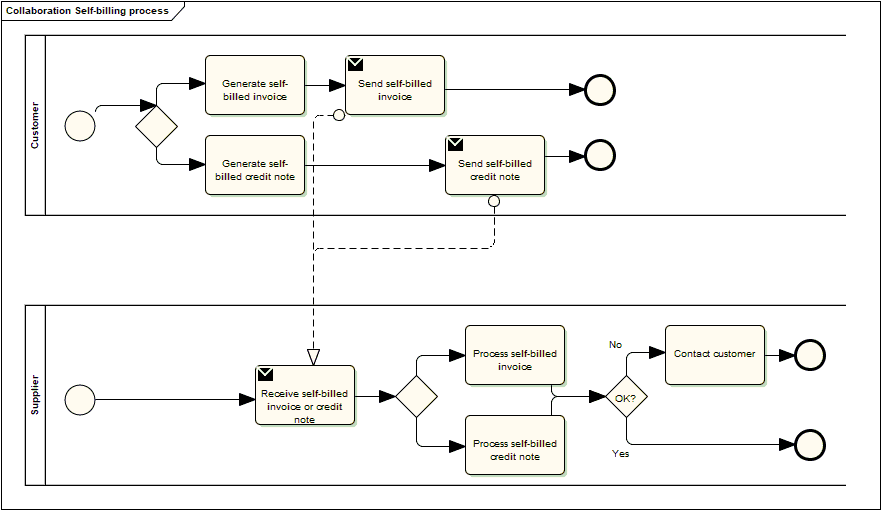
The self-billing process includes the creation, issuance, and transmission of the invoice and credit note by the Customer (acting as invoice issuer) to the Supplier (acting as invoice receiver), and the reception and processing of the same at the Supplier’s site.
In a self-billing scenario, the Customer assumes the role of invoice issuer, while the Supplier remains the Creditor from a commercial perspective.
The invoicing process is shown in this workflow:
-
A customer (acting as invoice issuer) creates and sends a self-billed invoice to a supplier. The invoice refers to one order and a specification of delivered goods and services.
An invoice may also refer to a contract or a frame agreement. The invoice may specify articles (goods and services) with article number or article description.
-
The supplier receives the self-billed invoice and processes it in their accounting or invoicing system.
The diagram below shows the basic self-billing process with the use of this Peppol BIS profile. This process assumes that both the self-billed invoice and the self-billed credit note are exchanged electronically.
This profile covers the following invoice processes:
| P1 |
Invoicing of deliveries of goods and services against purchase orders, based on a contract |
| P2 |
Invoicing deliveries of goods and services based on a contract |
| P3 |
Invoicing the delivery of an incidental purchase order |
| P4 |
Pre-payment |
| P5 |
Spot payment |
| P6 |
Payment in advance of delivery |
| P7 |
Invoices with references to a despatch advice |
| P8 |
Invoices with references to a despatch advice and a receiving advice |
| P9 |
Credit notes or invoices with negative amounts, issued for a variety of reasons including the return of empty packaging |
1.3. Invoice functionality
An invoice may support functions related to a number of related (internal) business processes. This Peppol BIS shall support the following functions:
-
Accounting
-
Invoice verification against the contract, the purchase order and the goods and service delivered
-
Tax reporting
-
Auditing
-
Payment
In the following chapters an assessment is made of what information is needed for each of the functions listed above and whether it is in scope or out of scope for this Peppol BIS.
Explicit support for the following functions (but not limited to) is out of scope:
-
Inventory management
-
Delivery processes
-
Customs clearance
-
Marketing
-
Reporting
1.3.1. Accounting
Recording a business transaction into the financial accounts of an organization is one of the main objectives of the invoice. According to financial accounting best practice and TAX rules every taxable person shall keep accounts in sufficient detail for tax to be applied and its application checked by the tax authorities. For that reason, an invoice shall provide the information at document and line level that enables booking on both the debit and the credit side.
1.3.2. Invoice verification
This process forms part of the Supplier’s internal business controls in a self-billing context.
The Supplier (as invoice receiver) shall verify that the self-billed invoice correctly reflects the underlying commercial transaction.
Support for invoice verification is a key function of an invoice. The invoice should provide sufficient information to look up relevant existing documentation, electronic or paper, for example, and as applicable:
-
the relevant purchase order
-
the contract
-
the call for tenders, that was the basis for the contract
-
the Customer’s reference
-
the confirmed receipt of the goods or services
-
delivery information
The invoice should also contain sufficient information that allows the received invoice to be transferred to a responsible authority, person or department, for verification and approval within the Supplier organisation.
1.3.3. Auditing
Companies audit themselves as means of internal control or they may be audited by external parties as part of a legal obligation. Accounting is a regular, ongoing process whereas an audit is a separate review process to ensure that the accounting has been carried out correctly. The auditing process places certain information requirements on an invoice. These requirements are mainly related to enable verification of authenticity and integrity of the accounting transaction.
Invoices, conformant to this PEPPOL BIS, support the auditing process by providing sufficient information for:
-
identification of the relevant Customer and Supplier
-
identification of the products and services traded, including description, value and quantity
-
information for connecting the invoice to its payment
-
information for connecting the invoice to relevant documents such as a contract and a purchase order
1.3.4. Tax Reporting
The invoice is used to carry tax-related information from the Supplier (as the taxable party) to the Customer, even though the invoice is issued by the Customer under a self-billing arrangement.
An invoice should contain sufficient information to enable the Customer and any auditor to determine whether the invoice is correct from a tax point of view.
The invoice shall allow the determination of the tax regime, the calculation and description of the tax, in accordance with the relevant legislation.
1.3.5. Payment
An invoice represents a claim for payment from the Supplier (Creditor), even when the invoice is issued by the Customer under a self-billing arrangement.
The issuance of an invoice may take place either before or after the payment is carried out. When an invoice is issued before payment it represents a request to the Customer to pay, in which case the invoice commonly contains information that enables the Customer, in the role of a debtor, to correctly initiate the transfer of the payment, unless that information is already agreed in prior contracts or by means of payment instructions separately lodged with the Customer.
If an invoice is issued after payment, such as when the order process included payment instructions or when paying with a credit card, online or telephonic purchases, the invoice may contain information about the payment made in order to facilitate invoice to payment reconciliation on the Customer side. An invoice may be partially paid before issuing such as when a pre-payment is made to confirm an order.
Invoices, conformant with this specification, should identify the means of payment for settlement of the invoice and clearly state what payment amount is requested. They should provide necessary details to support bank transfers. Payments by means of Credit Transfer, Direct debit, and Payment Card are in scope.
1.4. Credit notes and negative invoices
Reverting an invoice that has been issued and received can be done in two basic ways: either by issuing a credit note or a negative invoice. In a self-billing context, the corresponding document type codes for invoices and credit notes are '389' (self-billed invoice) and '261' (self-billed credit note), while the accounting principles described below remain unchanged.
-
When crediting by means of a credit note, the document type code is '381' (or its synonym), or '261' in the case of a self-billed credit note. The credit note quantities and extension/total amounts have the same sign (plus or minus) as the invoice that is being cancelled or credited. The document type code acts as an indicator that the given amounts are booked in reverse and cancel out the invoice amounts.
-
When crediting by means of a negative invoice, the document type code is '380' (or its synonym), or '389' in the case of a self-billed invoice. The negative invoice quantities and extension/total amounts have the opposite sign (minus versus plus) as the invoice being cancelled or credited. It is the mathematical sign that indicates that when the amounts are booked they cancel out the original amounts. The Price Amount must always be positive.
A credit note may include negative amounts when cancelling an invoice that may have negative line items or amounts.
1.5. Oman Business Processes
This section describes how the PINT Oman billing specification supports local business processes and document types.
1.5.1. Document Types
The following document types are supported in Oman:
| Document Type | Code | Description |
|---|---|---|
Tax Invoice |
380 |
Commercial invoice |
Credit Note |
381 |
Credit note |
Self-Billing Invoice |
389 |
Invoice issued by buyer on behalf of seller |
Self-Billing Credit Note |
261 |
Credit note issued under self-billing arrangement |
1.6. PINT Oman Validation Rules (IBR-OM)
This section defines the validation rules derived from the Schematron.
1.6.1. Scope
The validation applies to:
-
UBL Invoice
-
UBL CreditNote
It covers:
-
Transaction type interpretation
-
VAT validation
-
Currency consistency
-
Business scenario constraints
1.6.2. Transaction Type Model (BTOM-001)
General
The transaction type (BTOM-001) is the primary driver for validation.
|
All validation rules MUST be interpreted in the context of the transaction type. |
It determines:
-
Mandatory fields
-
Allowed combinations
-
VAT behavior
-
Scenario-specific rules
Structure
-
20-character binary string
-
Pattern:
[01]{20}
Constraints:
-
Position 1 (Full Tax) OR Position 2 (Simplified) MUST be
1
Bit Mapping
| Position | Meaning |
|---|---|
1 |
Full Tax Invoice |
2 |
Simplified Invoice |
3 |
Self-Billed |
4 |
Third Party |
5 |
Summary |
6 |
Continuous Supply |
7 |
Export |
8 |
Deemed Supply |
9 |
Import Reverse Charge (RCM) |
10 |
Profit Margin |
11 |
Profit Margin Self-Invoice |
12 |
E-Commerce |
13 |
Import of Goods |
14 |
Special Zone |
15 |
Prepayment |
1.6.3. Conditional Mandatory Fields
| Condition | Required Data |
|---|---|
Export |
Delivery country, export evidence |
Summary |
Invoice period (same month) |
Continuous Supply |
Invoice period |
Third Party |
Agent party details |
Import of Goods |
Import date, customs declaration |
Prepayment |
Prepaid amount, reference invoice |
Special Zone |
Subdivision code, license ID |
1.6.4. Core Header Rules
1.6.5. VAT Rules
VAT Categories
| Code | Description | Rule |
|---|---|---|
S |
Standard |
5% VAT MUST apply |
E |
Exempt |
VAT MUST be 0 |
O |
Outside scope |
VAT MUST be 0 |
1.6.6. Party Requirements
1.6.9. 11. Document References
For:
-
Credit Notes (381)
-
Debit Notes (383)
-
Self-Billed Credit Notes (261)
MUST include:
-
Original invoice ID
-
Issue date
-
UUID
-
Reason code
1.6.10. Governance Principles
| Principle | Description |
|---|---|
Transaction-driven validation |
Transaction type governs all rules |
Strict combinations |
Invalid combinations are rejected |
VAT consistency |
VAT breakdown must match source data |
Currency integrity |
Cross-currency validation enforced |
Scenario enforcement |
Context-specific rules must be satisfied |
2. Business information
In the subchapters below you find description of selected parts of the transaction.
2.1. Parties
The following roles may be specified. The same actor may play more than one role depending on the handling routine.
Further details on the roles/actors can be found in Roles.
2.1.1. Seller (AccountingSupplierParty)
Seller is mandatory information and provided in element cac:AccountingSupplierParty
<>
    <cac:Party>
        <cbc:EndpointID schemeID="0235">1XXXXXXX1</cbc:EndpointID>
        (1)
        <cac:PartyIdentification>
            <cbc:ID schemeID="0088">7300010000001</cbc:ID>
            (2)
        </cac:PartyIdentification>
        <cac:PartyName>
            <cbc:Name>SupplierTradingName Ltd.</cbc:Name>  (3)
        </cac:PartyName>
        <cac:PostalAddress>
            <cbc:StreetName>Street Name</cbc:StreetName>
            <cbc:AdditionalStreetName>Additional Street name</cbc:AdditionalStreetName>
            <cbc:CityName>Singapore</cbc:CityName>
            <cbc:PostalZone>Postal Zone</cbc:PostalZone>
            <cbc:CountrySubentity>West London district</cbc:CountrySubentity>
            <cac:AddressLine>
                <cbc:Line>Third address line</cbc:Line>
            </cac:AddressLine>
            <cac:Country>
                <cbc:IdentificationCode>OM</cbc:IdentificationCode>  (4)
            </cac:Country>
        </cac:PostalAddress>
        <cac:PartyTaxScheme>
            <cbc:CompanyID>1XXXXXXX1</cbc:CompanyID>
            (5)
            <cac:TaxScheme>
                <cbc:ID>VAT</cbc:ID>  (6)
            </cac:TaxScheme>
        </cac:PartyTaxScheme>
        <cac:PartyTaxScheme>
            <cbc:CompanyID>1XXXXXXX1</cbc:CompanyID>
            <cac:TaxScheme>
                <cbc:ID>VAT</cbc:ID>
            </cac:TaxScheme>
        </cac:PartyTaxScheme>
        <cac:PartyLegalEntity>
            <cbc:RegistrationName>SupplierOfficialName Ltd</cbc:RegistrationName>  (7)
            <cbc:CompanyID schemeAgencyID="TL" schemeAgencyName="Trade License issuing Authority">1XXXXXXX1</cbc:CompanyID>  (8)
            <cbc:CompanyLegalForm>Private Limited Company</cbc:CompanyLegalForm>
        </cac:PartyLegalEntity>
        <cac:Contact>  (9)
            <cbc:Name>Contact name</cbc:Name>
            <cbc:Telephone>Contact number</cbc:Telephone>
            <cbc:ElectronicMail>contact email ID</cbc:ElectronicMail>
        </cac:Contact>
    </cac:Party>
</cac:AccountingSupplierParty>| 1 | Seller electronic address (ibt-034), mandatory, the identification scheme identifier shall be chosen from the Electronic Address Scheme (EAS) list. |
| 2 | Seller identifier (ibt-029), if used, the identification scheme identifier shall be chosen from the entries of the list published by the ISO/IEC 6523 maintenance agency. |
| 3 | Sellers trading name (ibt-028). |
| 4 | Sellers country code (ibt-040). |
| 5 | Seller tax registration ID (ibt-031). |
| 6 | Tax scheme for the sellers tax registration. Use the appropriate code for the sellers jurisdiction, such as VAT or GST. |
| 7 | Seller legal registrated name (ibt-027). |
| 8 | Seller legal registration identifier (ibt-030), if used, the identification scheme identifier shall be chosen from the entries of the list published by the ISO/IEC 6523 maintenance agency. |
| 9 | Seller contact (ibg-06). |
2.1.2. Buyer (AccountingCustomerParty)
Buyer is mandatory information and provided in element cac:AccountingCustomerParty
<cac:AccountingCustomerParty>
    <cac:Party>
        <cbc:EndpointID schemeID="0235">1XXXXXXX1</cbc:EndpointID>
        (1)
        <cac:PartyIdentification>
            <cbc:ID schemeID="0002">FR23342</cbc:ID>
            (2)
        </cac:PartyIdentification>
        <cac:PartyName>
            <cbc:Name>BuyerTradingName AS</cbc:Name> (3)
        </cac:PartyName>
        <cac:PostalAddress>
            <cbc:StreetName>Street Name</cbc:StreetName>
            <cbc:AdditionalStreetName>Additional Street name</cbc:AdditionalStreetName>
            <cbc:CityName>CN</cbc:CityName>
            <cbc:PostalZone>Postal Zone</cbc:PostalZone>
            <cac:AddressLine>
                <cbc:Line>Third line</cbc:Line>
            </cac:AddressLine>
            <cac:Country>
                <cbc:IdentificationCode>OM</cbc:IdentificationCode> (4)
            </cac:Country>
        </cac:PostalAddress>
        <cac:PartyTaxScheme>
            <cbc:CompanyID>1XXXXXXX1</cbc:CompanyID>
            (5)
            <cac:TaxScheme>
                <cbc:ID>VAT</cbc:ID> (6)
            </cac:TaxScheme>
        </cac:PartyTaxScheme>
        <cac:PartyLegalEntity>
            <cbc:RegistrationName>Buyer Official Name</cbc:RegistrationName> (7)
            <cbc:CompanyID schemeAgencyID="TL" schemeAgencyName="Trade License issuing Authority">1XXXXXXX1</cbc:CompanyID> (8)
        </cac:PartyLegalEntity>
        <cac:Contact> (9)
            <cbc:Name>Contact name</cbc:Name>
            <cbc:Telephone>Contact number</cbc:Telephone>
            <cbc:ElectronicMail>contact email ID</cbc:ElectronicMail>
        </cac:Contact>
    </cac:Party>
</cac:AccountingCustomerParty>| 1 | Buyer electronic address (ibt-049), mandatory, the identification scheme identifier shall be chosen from the Electronic Address Scheme (EAS) list. |
| 2 | Buyer identifier (ibt-046), if used, the identification scheme identifier shall be chosen from the entries of the list published by the ISO/IEC 6523 maintenance agency. |
| 3 | Buyer trading name (ibt-045). |
| 4 | Buyer country code (ibt-055), mandatory. |
| 5 | Buyer tax registration ID (ibt-048). |
| 6 | Tax scheme for the buyer tax registration. Use the appropriate code for the buyers jurisdiction, such as VAT or GST. |
| 7 | Buyer legal registered name (ibt-044). |
| 8 | Buyer legal registration identifier (ibt-047), if used, the identification scheme identifier shall be chosen from the entries of the list published by the ISO/IEC 6523 maintenance agency. |
| 9 | Buyer contact (ibg-09). |
2.1.3. Payment receiver (PayeeParty)
Payment receiver is optional information. If this information is not supplied, the seller is the payment receiver. When payee information is sent this is indicating that a factoring situation is being documented.
To reflect the assignment of an Invoice to a factor there is a need to:
-
have a disclaimer (notification notice) on the Invoice that the Invoice has been assigned to a factor. The disclaimer should be given using the Invoice note (IBT-22) on document level.
-
identify the Factor as the Payee
-
to have the bank account changed to favour of a Factor.
<cac:PayeeParty>
    <cac:PartyIdentification>
        <cbc:ID schemeID="0235">987654325</cbc:ID>
        (1)
    </cac:PartyIdentification>
    <cac:PartyName>
        <cbc:Name>Payee party</cbc:Name>
    </cac:PartyName>
    <cac:PartyLegalEntity>
        <cbc:CompanyID schemeAgencyID="TL" schemeAgencyName="Trade License issuing Authority">1XXXXXXX1</cbc:CompanyID>
        (2)
    </cac:PartyLegalEntity>
</cac:PayeeParty>| 1 | schemeID attribute is recommended for all party identifiers |
| 2 | schemeID attribute is recommended for party legal entity identifiers |
2.1.4. Sellers Tax Representative (TaxRepresentativeParty)
Tax representative party for the seller is relevant for sellers delivering goods and services in a country without having a permanent establishment in that country. In such cases information on the tax representative shall be included in the invoice.
<cac:TaxRepresentativeParty>
    <cac:PartyName>
        <cbc:Name>TaxRepresentative Name</cbc:Name>
    </cac:PartyName>
    <cac:PostalAddress>
        <cbc:StreetName>Regent street 32</cbc:StreetName>
        <cbc:AdditionalStreetName>Additional Street name</cbc:AdditionalStreetName>
        <cbc:CityName>CN</cbc:CityName>
        <cbc:PostalZone>Postal Zone</cbc:PostalZone>
        <cbc:CountrySubentity>Subentity</cbc:CountrySubentity>
        <cac:AddressLine>
            <cbc:Line>Back door</cbc:Line>
        </cac:AddressLine>
        <cac:Country>
            <cbc:IdentificationCode>OM</cbc:IdentificationCode>
        </cac:Country>
    </cac:PostalAddress>
    <cac:PartyTaxScheme>
        <cbc:CompanyID>1XXXXXXX1</cbc:CompanyID>
        (1)
        <cac:TaxScheme>
            <cbc:ID>VAT</cbc:ID>
        </cac:TaxScheme>
    </cac:PartyTaxScheme>
</cac:TaxRepresentativeParty>| 1 | Tax identifier of seller tax representative (ibt-063) |
2.2. Delivery Details (Date and Location)
Delivery details may be given at document level.
Place and date of delivery is recommended, and should be sent unless this does not affect the ability to ensure the correctness of the invoice.
The delivery element contains information on name, address and delivery location identifier (cac:Delivery/cac:DeliveryLocation/cbc:ID) which may be used if the place of delivery is defined through an identifier. For example GLN (Global Location Number)issued by GS1.
<cac:Delivery>
    <cbc:ActualDeliveryDate>2017-11-01</cbc:ActualDeliveryDate>
    <cac:DeliveryLocation>
        <cbc:ID schemeID="0088">7300010000001</cbc:ID>
        <cac:Address> (1)
            <cbc:StreetName>Delivery street 2</cbc:StreetName>
            <cbc:AdditionalStreetName>Additional Street name</cbc:AdditionalStreetName>
            <cbc:CityName>CN</cbc:CityName>
            <cbc:PostalZone>Postal Zone</cbc:PostalZone>
            <cac:AddressLine>
                <cbc:Line>Gate 15</cbc:Line>
            </cac:AddressLine>
            <cac:Country>
                <cbc:IdentificationCode>OM</cbc:IdentificationCode> (2)
            </cac:Country>
        </cac:Address>
    </cac:DeliveryLocation>
    <cac:DeliveryParty> (3)
        <cac:PartyName>
            <cbc:Name>Delivery party Name</cbc:Name>
        </cac:PartyName>
    </cac:DeliveryParty>
</cac:Delivery>| 1 | Deliver to address (ibg-15), the address to which goods and services invoiced were or are delivered. |
| 2 | Deliver to country code (ibt-080), mandatory |
| 3 | Deliver to party name (ibt-070), the name of the party to which the goods and services are delivered. |
2.3. References and attachments
Support for invoice verification is a key function of an invoice. The invoice should provide sufficient information to look up relevant existing documentation, electronic or paper.
| Any reference element should contain valid information, if you do not have a reference, the element should not be present in the instance document. |
The invoice and credit note transactions supports the following references to existing documentation:
2.3.1. Purchase order and sales order reference
The purchase order reference is a conditional business term. If the customer has issued a purchase order should be referenced by providing its identifier in the resulting invoice, otherwise the Buyer reference should be used (see Buyer reference).
If the purchase order is referenced at the invoice header level, the order reference element on line level can be used to state the relevant line numbers in the order .
A sales order is issued by the seller, confirming the sale of specified products and may be provided in the invoice.
| In the invoice, both a purchase order and a sales order reference can be given, but be aware that an invoice instance cannot reference a sales order, without providing the corresponding purchase order reference. |
<cac:OrderReference>
    <cbc:ID>o-998877</cbc:ID> (1)
    <cbc:SalesOrderID>so-12343</cbc:SalesOrderID> (2)
</cac:OrderReference>| 1 | Purchase order reference |
| 2 | Sales order reference |
2.3.2. Buyer reference
The buyer reference, known as Your ref, is conditional. An invoice shall have either the buyer reference or the order reference (see Purchase order and sales order reference)
The element is used for the reference of who ordered the products/services. Example being the name of the person ordering, employee number or a code identifying this person or department/group. Your ref is often used for internal routing at recipient, and hence it is important to fill this element with the correct values according to the need of the recipient.
If neither buyer reference nor a reference to an order is supplied by the customer, the name of the person ordering or appointed for the customer can be supplied in buyer reference if known by the supplier.
| When reference is provided by the customer, the correct element shall contain the provided reference. |
<cbc:BuyerReference>0150abc</cbc:BuyerReference>2.3.3. Invoiced object identifier
The invoiced object identifier is the identifier for an object on which the invoice is based, given by the Seller. Examples may be a subscription number, telephone number, meter point, vehicle, person etc., as applicable.
If it is not clear to the receiver what scheme is used for the identifier, an optional scheme identifier attribute should be used, that shall be chosen from the Invoiced object identifier scheme code list.
The invoiced object reference is provided by using the element cac:AdditionalDocumentReference with the document type code = 130
<cac:AdditionalDocumentReference>
    <cbc:ID schemeID="ABT">DR35141</cbc:ID>  (1) (2)
    <cbc:DocumentTypeCode>130</cbc:DocumentTypeCode> (3)
</cac:AdditionalDocumentReference>| 1 | Invoice object identifier scheme is given as an attribute on the identifier. It states the type of the identifier according to code list UN/CEFACT 1153 |
| 2 | An identifier of an object that the invoice relates to. |
| 3 | A code that qualifies the identifier as an invoiced object identifiers. Document type code "130" qualifies that. |
2.3.4. Contract reference
To reference or match an invoice to a purchase contract, the contract number could be specified like this:
<cac:ContractDocumentReference>
    <cbc:ID>framework no 1</cbc:ID>
</cac:ContractDocumentReference>
2.3.5. Despatch and receipt advice references
Document level
To reference or match an invoice to a despatch or receipt advice use the following elements:
<cac:DespatchDocumentReference>
    <cbc:ID>despadv-3</cbc:ID> (1)
</cac:DespatchDocumentReference>
<cac:ReceiptDocumentReference>
    <cbc:ID>resadv-1</cbc:ID> (2)
</cac:ReceiptDocumentReference>| 1 | Despatch advice |
| 2 | Receipt advice |
2.3.6. Tender reference
To identify the call for tender or lot the invoice relates to, use the 'OriginatorDocumentReference'. The identifier is, in most cases, the Procurement Procedure Identifier.
<cac:OriginatorDocumentReference>
    <cbc:ID>ppid-123</cbc:ID>
</cac:OriginatorDocumentReference>
2.3.7. Project reference
The project reference is optional to use, and is sent in an invoice in the element cac:ProjectReference/cbc:ID. In a credit note, this element does not exist, and project reference
is sent by using the element cac:AdditionalDocumentReference[cbc:DocumentTypeCode='50']/cbc:ID.
- NOTE
-
When sending the project reference, only the
cbc:IDand thecbc:DocumentTypeCodeare allowed in thecac:AdditionalDocumentReferenceelement.
<cac:ProjectReference>
    <cbc:ID>project333</cbc:ID>
</cac:ProjectReference>
2.3.8. Preceding invoice references
A credit note or negative invoice can refer to one or more initial invoice(s). This is done in the business group BG-3 Preceding invoice reference, providing the invoice number and issue date. The issue date shall be provided in case the preceding invoice reference is not unique.
In case correction applies to a large number of invoices, the invoicing period (BG-14), as necessary combined with a clarifying invoice note (IBT-22), may instead be given at document level.
2.3.9. Attachments
An invoice may contain a supportive document as informative. Examples of such documents may be work reports, certificates or other documents that relate to the purchase or the invoiced items. A supportive document can be attached to the invoice in two ways: by providing a direct hyperlink through which the document can be downloaded or by embedding the document into the invoice. A compliant receiver is required to be able to receive an attached supportive document and, in case of embedded files, to convert it into a file but he is not required to handle the content of that file since it is only provided as informative.
When attaching a document using an uri the hyperlink shall point directly to the file that is to be downloaded.
An embedded document is contained in the invoice as binary object using base64 encoding and shall be supplemented with information about the name of the document file and a mime code indicating the type of the file. This allows the receiver to convert the binary code into a file that has the same name as the original file and allows him to associate the received file to a suitable application for viewing its content. The set of allowed codes for the file type (mime code) is limited to types that can be opened with applications that are commonly used and available.
As is with other file types, when an attached file is an XML file the receiver is expected to be able to receive and convert the binary object into an XML file but the sender can not expect the receiver to view or process the content of that XML file. Any further handling of an embedded XML file attachment is optional for the receiver.
 <cac:AdditionalDocumentReference>
    <cbc:ID>ts12345</cbc:ID> (1)
    <cbc:DocumentDescription>Technical specification</cbc:DocumentDescription> (2)
    <cac:Attachment>
        <cac:ExternalReference>
            <cbc:URI>www.techspec.no</cbc:URI> (3)
        </cac:ExternalReference>
    </cac:Attachment>
</cac:AdditionalDocumentReference><cac:AdditionalDocumentReference>
<cbc:ID>mr4343</cbc:ID> (1)
<cbc:DocumentDescription>milage report</cbc:DocumentDescription> (2)
<cac:Attachment>
<cbc:EmbeddedDocumentBinaryObject mimeCode="text/csv" filename="milage.csv"
>bWlsYWdlIHJlcG9ydA==</cbc:EmbeddedDocumentBinaryObject> (4)
</cac:Attachment>
</cac:AdditionalDocumentReference>-
An identifier of the supporting document (ibt-122)
-
A description of the supporting document (ibt-123)
-
The URL (Uniform Resource Locator) that identifies where the external document is located (ibt-124)
-
An attached document embedded as binary object or sent together with the invoice. (ibt-125). The file type is given with the attribute "mimeCode" (ibt-125-1) and the name of the original file is given in the attribute "filename" (ibt-125-2).
2.3.10. Shipment, Delivery and Trade Terms
This section defines how shipment-related information, customs references, and Incoterms MUST be represented and validated.
Overview
Shipment and trade-related data is represented using the following business terms:
| Business Term | Description | UBL Mapping |
|---|---|---|
BTOM-022 |
Incoterms |
cac:DeliveryTerms / cbc:ID |
BTOM-021 |
Customs Declaration Number |
cac:Shipment / cbc:ID |
BTOM-020 |
Import Date |
cac:Shipment / cac:Delivery / cbc:ActualDeliveryDate |
Incoterms (BTOM-022)
Incoterms define the responsibilities of buyer and seller in international trade.
Shipment Information (BTOM-021)
Shipment data is represented using cac:Shipment.
Import Date (BTOM-020)
The import date represents the date when goods are delivered or cleared for import.
Transaction Type Dependencies
The requirement for shipment-related data is driven by transaction type.
| Transaction Type | Requirement |
|---|---|
Import of Goods |
Customs declaration number MUST be provided Import date MUST be provided |
Export |
Incoterms SHOULD be provided |
Other transactions |
Shipment data MAY be provided |
|
Transaction type (BTOM-001) determines whether shipment data is mandatory. |
Validation Rules
The following constraints MUST be satisfied:
-
Shipment data MUST be structured under
cac:Shipment -
Incoterms MUST use:
-
cbc:ID -
@schemeID="incoterms"
-
-
Import transactions MUST include:
-
Customs declaration number
-
Import date
-
-
Data MUST be consistent with transaction type
Compliance Principles
| Principle | Description |
|---|---|
Transaction-driven validation |
Shipment requirements depend on transaction type |
Structural integrity |
Shipment data MUST follow the defined UBL hierarchy |
Trade standard compliance |
Incoterms MUST follow internationally recognized codes |
Data completeness |
Import transactions require complete customs information |
Auditability |
Shipment and customs data MUST be verifiable |
2.4. Allowances and Charges
The Invoice and credit note transactions has elements for Allowance/charge on 3 levels.
The element cac:AllowanceCharge with sub element cbc:ChargeIndicator indicates whether the instance is a charge (true) or an allowance (false).
- The header level
-
Applies to the whole invoice and is included in the calculation of the invoice total amount.
-
Several allowances and charges may be supplied
-
Specification of TAX for allowances and charges,
cac:TaxCategorywith sub elements, shall be supplied -
The sum of all allowances and charges on the header level shall be specified in
cbc:AllowanceTotalAmountandcbc:ChargeTotalAmountrespectively.
-
- The line level
-
Applies to the line level and is included in the calculation of the line amount.
-
Several allowances and charges may be supplied
-
Specification of TAX for allowances and charges shall not be specified, as the TAX category stated for the invoice line itself, applies also to the allowances or charges of that line.
-
The sum of all allowances and charges on the line level shall be taken into account, subtracted or added, when calculating the line extension amount . These line level allowances and charges shall not be calculated into the header level elements.
-
- The line level Price element
-
A way to inform the buyer how the price is set. Is also relevant if the seller or buyer want to post the allowance in their accounting systems. The price itself shall always be the net price, i.e. the base amount reduced with a discount (allowance).
-
Only one occurrence of allowance (discount) is allowed.
-
Specification of TAX for allowance shall not be specified
-
Allowance related to Price shall not be part of any other calculations.
-
Allowance related to Price may specify amount and the base amount.
-
<cac:AllowanceCharge>
    <cbc:ChargeIndicator>true</cbc:ChargeIndicator> (1)
    <cbc:AllowanceChargeReasonCode>FC</cbc:AllowanceChargeReasonCode>
    <cbc:AllowanceChargeReason>Freight service</cbc:AllowanceChargeReason>
    <cbc:MultiplierFactorNumeric>20</cbc:MultiplierFactorNumeric> (4)
    <cbc:Amount currencyID="OMR">200</cbc:Amount> (5)
    <cbc:BaseAmount currencyID="OMR">1000</cbc:BaseAmount> (3)
    <cac:TaxCategory>
        <cbc:ID>SR</cbc:ID>
        <cbc:Percent>9</cbc:Percent>
        <cac:TaxScheme>
            <cbc:ID>VAT</cbc:ID>
        </cac:TaxScheme>
    </cac:TaxCategory>
</cac:AllowanceCharge>
<cac:AllowanceCharge>
    <cbc:ChargeIndicator>false</cbc:ChargeIndicator> (2)
    <cbc:AllowanceChargeReasonCode>65</cbc:AllowanceChargeReasonCode>
    <cbc:AllowanceChargeReason>Production error discount</cbc:AllowanceChargeReason>
    <cbc:Amount currencyID="OMR">300</cbc:Amount>
    <cac:TaxCategory>
        <cbc:ID>SR</cbc:ID>
        <cbc:Percent>9</cbc:Percent>
        <cac:TaxScheme>
            <cbc:ID>VAT</cbc:ID>
        </cac:TaxScheme>
    </cac:TaxCategory>
</cac:AllowanceCharge>| 1 | ChargeIndicator = true to indicate a charge |
| 2 | ChargeIndicator = false to indicate an allowance |
| 3 | Base amount, to be used with the percentage to calculate the amount |
| 4 | Charge percentage |
| 5 | \$"Amount" = "Base amount" times ("Percentage" div 100)\$ |
<cac:InvoiceLine>
    <!-- Code omitted for clarity -->
    <cac:AllowanceCharge>
        <cbc:ChargeIndicator>true</cbc:ChargeIndicator>
        <cbc:AllowanceChargeReasonCode>CG</cbc:AllowanceChargeReasonCode>
        <cbc:AllowanceChargeReason>Cleaning</cbc:AllowanceChargeReason>
        <cbc:MultiplierFactorNumeric>10</cbc:MultiplierFactorNumeric>
        <cbc:Amount currencyID="OMR">1</cbc:Amount>
        <cbc:BaseAmount currencyID="OMR">10</cbc:BaseAmount>
    </cac:AllowanceCharge>
    <cac:AllowanceCharge>
        <cbc:ChargeIndicator>false</cbc:ChargeIndicator>
        <cbc:AllowanceChargeReasonCode>95</cbc:AllowanceChargeReasonCode>
        <cbc:AllowanceChargeReason>Discount</cbc:AllowanceChargeReason>
        <cbc:Amount currencyID="OMR">101</cbc:Amount>
    </cac:AllowanceCharge>
2.5. Payment means information
2.5.1. Credit transfer
| Payment means code 30 as defined below shall be supported by all receivers of a PINT compliant invoice. This payment method acts as the common denominator for global trade. |
If payment is made by credit transfer, the Payment account identifier (IBT-84) is mandatory
Examples of codes for payment by credit transfer are:
-
30 - Credit transfer
<cac:PaymentMeans>
    <cbc:PaymentMeansCode name="Credit transfer">30</cbc:PaymentMeansCode>(1)
    <cbc:PaymentID>93274234</cbc:PaymentID>(2)
    <cac:PayeeFinancialAccount>
        <cbc:ID>32423940</cbc:ID>(3)
        <cbc:Name>AccountName</cbc:Name>
        <cac:FinancialInstitutionBranch>
            <cbc:ID>BIC32409</cbc:ID>(4)
        </cac:FinancialInstitutionBranch>
    </cac:PayeeFinancialAccount>
</cac:PaymentMeans>| 1 | Mandatory, payment means code for credit transfer |
| 2 | Remittance information |
| 3 | Mandatory, IBAN (in case of a SEPA payment) or a national account number (BBAN) |
| 4 | BIC or a national clearing code |
2.5.2. Card Payment
If the Buyer had opted to pay by using a payment card such as a credit or debit card, information on the Primary Account Number (PAN) shall be present in the invoice.
Examples of codes for payment by card are:
-
48 - Bank card
-
54 - Credit card
-
55 - Debit card
<cac:PaymentMeans>
    <cbc:PaymentMeansCode name="Credit card">54</cbc:PaymentMeansCode>(1)
    <cbc:PaymentID>9387439</cbc:PaymentID>
    <cac:CardAccount>
        <cbc:PrimaryAccountNumberID>123236</cbc:PrimaryAccountNumberID>(2)
        <cbc:NetworkID>VISA</cbc:NetworkID>(3)
        <cbc:HolderName>Card holders name</cbc:HolderName>(4)
    </cac:CardAccount>
</cac:PaymentMeans>| 1 | Payment means code for credit card |
| 2 | Mandatory, shall be the last 4 to 6 digits of the payment card number |
| 3 | Mandatory, used to identify the financial service network provider of the card. Examples are VISA, MasterCard, American Express. |
| 4 | Card holder name |
2.6. Item information
2.6.1. Item identifiers
In an invoice line the seller item identifier, the buyer item identifier and the standard item identifier can be provided. For sellers and buyers item identifiers, no scheme attribute is used, whilst the schemeID
is mandatory for the standard item identification, and must be from the ISO 6523 ICD list.
<cac:BuyersItemIdentification>
    <cbc:ID>b-13214</cbc:ID>
</cac:BuyersItemIdentification>
<cac:SellersItemIdentification>
    <cbc:ID>97iugug876</cbc:ID>
</cac:SellersItemIdentification>
<cac:StandardItemIdentification>
    <cbc:ID schemeID="0160">97iugug876</cbc:ID> (1)
</cac:StandardItemIdentification>| 1 | 0160 is the ICD value for a GTIN identifier |
2.6.2. Item classification
Several different item classification codes can be provided per invoice line, and the codes must be from one of the classification schemes in code list UNCL7143.
<cac:CommodityClassification>
    <cbc:ItemClassificationCode listID="STI">09348023</cbc:ItemClassificationCode>(1)
</cac:CommodityClassification>| 1 | listID must be from UNCL7143 code list, and code STI indicates this is a CPV classification. |
<cac:CommodityClassification>
    <cbc:ItemClassificationCode listID="TST" listVersionID="19.05.01">86776</cbc:ItemClassificationCode>(1)
</cac:CommodityClassification>| 1 | listID must be from UNCL7143 code list, and code TST indicates this is a UNSPSC classification, listVersionID is optional, but can be used to specify the version of UNSPSC. NOTE, in previous versions code MP was used as temporary workaround to identify UNSPSC. In fall release 2019 it is replaced with the new 7143 code TST that is specific for UNSPSC. |
2.7. Price information
An invoice must contain information about the item net price and additional information such as gross price, item price base quantity and price discount may be added.
For details on calculating price see Item net price (IBT-146).
<cac:Price>
    <cbc:PriceAmount currencyID="OMR">410</cbc:PriceAmount> (4)
    <cbc:BaseQuantity unitCode="C62">1</cbc:BaseQuantity> (3)
    <cac:AllowanceCharge>
        <cbc:ChargeIndicator>false</cbc:ChargeIndicator>
        <cbc:Amount currencyID="OMR">40</cbc:Amount> (2)
        <cbc:BaseAmount currencyID="OMR">450</cbc:BaseAmount> (1)
    </cac:AllowanceCharge>
</cac:Price>| 1 | Item gross price |
| 2 | Item price discount |
| 3 | Item price base quantity |
| 4 | Item net price, must be equal to Item Gross price - item price discount (if these elements are used) |
<cac:Price>
    <cbc:PriceAmount currencyID="OMR">200</cbc:PriceAmount>
    <cbc:BaseQuantity unitCode="C62">2</cbc:BaseQuantity>
</cac:Price>
2.8. Unit of measure
Unit of measure in an invoice allows the use of codes from UNECE Recommendation No. 20 (version 11e), as well as codes from UNECE Recommendation No. 21 prefixed with an X.
| Code | Name |
|---|---|
H87 |
Piece |
KGM |
Kilogram |
MTR |
Meter |
LTR |
Litre |
MTK |
Square metre |
MTQ |
Cubic metre |
KTM |
Kilometre |
TNE |
Tonne (metric ton) |
KWH |
Kilowatt hour |
DAY |
Day |
HUR |
Hour |
MIN |
Minute |
| Code | Name |
|---|---|
XBG |
Bag |
XBX |
Box |
XCT |
Carton |
XCY |
Cylinder |
XBA |
Barrel |
XPK |
Package |
XPX |
Pallet |
XRL |
Reel |
XSA |
Sack |
XST |
Sheet |
<cbc:InvoicedQuantity unitCode="C62">1</cbc:InvoicedQuantity> (1)
<cbc:InvoicedQuantity unitCode="XPX">1</cbc:InvoicedQuantity> (2)| 1 | Code H87 from Recommendation no. 20 |
| 2 | Code PX, prefixed with an X from Recommendation no. 21 |
3. Tax information
3.1. Tax in Accounting Currency
This section defines how VAT MUST be represented when the invoice currency differs from the VAT accounting currency.
3.1.1. General Principle
In Oman:
-
VAT reporting currency MUST be
OMR -
When invoice currency differs from OMR, VAT MUST be expressed in both:
-
Invoice currency
-
VAT accounting currency (OMR)
-
3.1.2. Currency Identification
| ID | Element | Rule |
|---|---|---|
ibt-005 |
Invoice currency |
Currency used for the invoice |
ibt-006 |
Tax accounting currency |
MUST be |
BTOM-003 |
Exchange rate |
MUST be provided when currencies differ |
3.1.3. Currency Model
| Condition | Requirement |
|---|---|
Invoice currency = OMR |
- Tax currency MUST NOT be provided - Exchange rate MUST NOT be provided |
Invoice currency ≠ OMR |
- Tax currency MUST be |
3.1.4. VAT Amount Representation
Two VAT representations are supported:
| Field | Description |
|---|---|
ibt-110 |
VAT amount in invoice currency |
ibt-111 |
VAT amount in tax accounting currency (OMR) |
3.1.5. Currency Conversion Rule
VAT amounts MUST satisfy the following relation:
VAT (OMR) ≈ Exchange Rate × VAT (Invoice Currency)
|
3.1.6. Exchange Rate Constraints
The exchange rate MUST comply with:
-
Source currency = Invoice currency
-
Target currency = Tax currency (OMR)
-
Format:
-
Numeric
-
Maximum 7 decimal places
-
3.1.7. VAT Consistency in Accounting Currency
When tax currency is provided:
-
All VAT amounts in
cac:TaxTotalwithcurrencyID = OMRMUST:-
Be expressed consistently in OMR
-
Match the sum of VAT subtotals
-
3.1.8. VAT Breakdown Rules
3.1.9. VAT Category Rules
| Category | VAT Rate | VAT Amount Rule |
|---|---|---|
S |
5% |
MUST be calculated |
E |
Optional |
MUST be 0 |
O |
Optional |
MUST be 0 |
3.1.10. VAT Breakdown Grouping
Each VAT breakdown is uniquely defined by:
-
VAT category code
-
VAT rate
|
Differences in trailing decimals (e.g. |
3.1.11. Example — VAT in Dual Currency
<cbc:DocumentCurrencyCode>EUR</cbc:DocumentCurrencyCode>
<cbc:TaxCurrencyCode>OMR</cbc:TaxCurrencyCode>
<cac:TaxTotal>
        <cbc:TaxAmount currencyID="EUR">200.00</cbc:TaxAmount>
        <cac:TaxSubtotal>
                <cbc:TaxableAmount currencyID="EUR">4000.00</cbc:TaxableAmount>
                <cbc:TaxAmount currencyID="EUR">200.00</cbc:TaxAmount>
                <cac:TaxCategory>
                        <cbc:ID>S</cbc:ID>
                        <cbc:Percent>5</cbc:Percent>
                </cac:TaxCategory>
        </cac:TaxSubtotal>
</cac:TaxTotal>
<cac:TaxTotal>
        <cbc:TaxAmount currencyID="OMR">167.58</cbc:TaxAmount>
</cac:TaxTotal>
3.1.12. VAT Reporting Requirements
Invoices MUST provide sufficient VAT information to:
-
Enable accurate VAT reporting
-
Support audit verification
-
Clearly identify:
-
VAT category
-
VAT calculation logic
-
Applied VAT treatment
-
3.1.13. Key Compliance Principles
| Principle | Description |
|---|---|
Fixed tax currency |
VAT accounting currency is always OMR |
Currency linkage |
Exchange rate governs consistency between currencies |
Mathematical integrity |
VAT MUST be consistent across currencies within tolerance |
Structural consistency |
VAT breakdown MUST reflect invoice data exactly |
Zero VAT enforcement |
Categories |
Auditability |
All VAT data MUST be traceable and verifiable |
4. Rules
The information given in a PINT invoice must comply to a set of rules on the content of the business terms as well as the relationship between them.
4.1. Calculations
4.1.1. Calculation of totals
Formulas for the calculations of totals are as follows:
| Business term id | Term name | Calculation |
|---|---|---|
IBT-106 |
Sum of invoice line net amounts |
\$sum("IBT-131: Invoice line net amount")\$ |
IBT-107 |
Sum of allowances on document level |
\$sum("IBT-92: Document level allowance amount")\$ |
IBT-108 |
Sum of charges on document level |
\$sum("IBT-99: Document level charge amount")\$ |
IBT-109 |
Invoice total amount without TAX |
\$\ \ \ \ "IBT-106: Sum of invoice line net amounts"\$ |
IBT-110 |
Invoice total TAX amount |
\$sum("IBT-117: TAX category tax amount")\$ |
IBT-112 |
Invoice total amount with TAX |
\$\ \ \ \ "IBT-109: Invoice total amount without TAX"\$ |
IBT-115 |
Amount due for payment |
\$\ \ \ \ "IBT-112: Invoice total amount with TAX"\$ |
4.1.2. UBL syntax calculation formulas
The following elements show the legal monetary totals for an invoice or credit note
| Element | Formula |
|---|---|
<cbc:LineExtensionAmount> |
\$sum("cac:InvoiceLine/cbc:LineExtensionAmount")\$ |
<cbc:AllowanceTotalAmount> |
\$sum("cac:AllowanceCharge[ChargeIndicator='false']/cbc:Amount")\$ |
<cbc:ChargeTotalAmount> |
\$sum("cac:AllowanceCharge[ChargeIndicator='true']/cbc:Amount")\$ |
<cbc:TaxExclusiveAmount> |
\$\ \ \ \ "cac:LegalMonetaryTotal/cbc:LineExtensionAmount"\$ |
<cbc:TaxInclusiveAmount> |
\$\ \ \ \ "cac:LegalMonetaryTotal/cbc:TaxExclusiveAmount"\$ |
<cbc:PrepaidAmount> |
Not applicable |
<cbc:PayableRoundingAmount> |
Not applicable |
<cbc:PayableAmount> |
\$\ \ \ \ "cac:LegalMonetaryTotal/cbc:TaxInclusiveAmount"\$ |
Element for rounding amount, the PayableRoundingAmount
It is possible to round the expected payable amount.
The element cac:LegalMonetaryTotal/cbc:PayableRoundingAmount is used for this purpose and is specified on the header level. This value shall be added to the value in cac:LegalMonetaryTotal/cbc:PayableAmount.
4.1.3. Calculation on line level
Item net price (IBT-146)
If gross price and discount exist, the Item net price has to equal with the item gross price less the item price discount.
Calculation formula:
\$"Item net price" = "Item gross price (IBT-148)" - "Item price discount (IBT-147)"\$
<cac:Price>
    <cbc:PriceAmount currencyID="OMR">410</cbc:PriceAmount>(3)
    <cbc:BaseQuantity unitCode="C62">1</cbc:BaseQuantity>
    <cac:AllowanceCharge>
        <cbc:ChargeIndicator>false</cbc:ChargeIndicator>
        <cbc:Amount currencyID="OMR">40</cbc:Amount>(2)
        <cbc:BaseAmount currencyID="OMR">450</cbc:BaseAmount>(1)
    </cac:AllowanceCharge>
</cac:Price>| 1 | Item gross price |
| 2 | Item price discount |
| 3 | \$"Item price net amount" = "Item gross price" - "Item price discount"\$ |
Invoice line net amount (IBT-131)
The invoice line net amount (IBT-131) is as the name implies the net amount without TAX, and inclusive of line level allowance and charges.
The formula for calculating the invoice line net amount is:
\$"Item line net amount" = (("Item net price (IBT-146)" div "Item price base quantity (IBT-149)")\$
\$times ("Invoiced Quantity (IBT-129)")\$
\$+ "Invoice line charge amount (IBT-141)" - "Invoice line allowance amount (IBT-136)"\$
|
If the line net amount must be rounded to maximum decimals, please note that the different parts of the calculation must be rounded separately. I.e the result of: \$"Item line net amount" = (("Item net price (IBT-146)" div "Item price base quantity (IBT-149)") times ("Invoiced Quantity (IBT-129)")\$ must be rounded to maximum decimals, and the allowance/charge amounts are also rounded separately. |
<cbc:InvoicedQuantity unitCode="C62">10</cbc:InvoicedQuantity>(3)
<cbc:LineExtensionAmount currencyID="OMR">1000.00</cbc:LineExtensionAmount>(4)
<!-- Code omitted for clarity-->
<cac:Price>
    <cbc:PriceAmount currencyID="OMR">200</cbc:PriceAmount>(1)
    <cbc:BaseQuantity unitCode="C62">2</cbc:BaseQuantity>(2)
</cac:Price>| 1 | Item net price |
| 2 | Item price base quantity |
| 3 | Invoiced quantity |
| 4 | \$"Invoice line net amount" = (("Item net price" div "Item price base quantity") times ("Invoiced Quantity")\$ |
<cbc:InvoicedQuantity unitCode="C62">10</cbc:InvoicedQuantity>(4)
<cbc:LineExtensionAmount currencyID="OMR">900.00</cbc:LineExtensionAmount>(5)
<!-- Code omitted for clarity-->
 <cac:AllowanceCharge>
    <cbc:ChargeIndicator>true</cbc:ChargeIndicator>
    <cbc:AllowanceChargeReasonCode>CG</cbc:AllowanceChargeReasonCode>
    <cbc:AllowanceChargeReason>Charge</cbc:AllowanceChargeReason>
    <cbc:MultiplierFactorNumeric>1</cbc:MultiplierFactorNumeric>
    <cbc:Amount currencyID="OMR">1</cbc:Amount>(2)
    <cbc:BaseAmount currencyID="OMR">100</cbc:BaseAmount>
</cac:AllowanceCharge>
<cac:AllowanceCharge>
    <cbc:ChargeIndicator>false</cbc:ChargeIndicator>
    <cbc:AllowanceChargeReasonCode>95</cbc:AllowanceChargeReasonCode>
    <cbc:AllowanceChargeReason>Discount</cbc:AllowanceChargeReason>
    <cbc:Amount currencyID="OMR">101</cbc:Amount>(3)
</cac:AllowanceCharge>
<!-- Code omitted for clarity-->
<cac:Price>
    <cbc:PriceAmount currencyID="OMR">100</cbc:PriceAmount>(1)
</cac:Price>| 1 | Item net price |
| 2 | Line charge amounts |
| 3 | Line allowance amount |
| 4 | Invoiced quantity |
| 5 | \$"Invoice line net amount" = ("Item net price" times "Invoiced Quantity") + "line charge amount" - "line allowance amount"\$ |
4.1.4. Calculation of allowance/charge amount
Allowance and charge on document- and line level consists of elements carrying information on the allowance/charge base amount and the allowance/charge percentage. These are, if present in the invoice instance, used for calculating the allowance/charge amount.
If base amount is present, the percentage shall also be present, and if percentage is present, the base amount shall also be present, and the calculation of the amount shall be:
\$"Amount" = "Base amount" times ("Percentage" div 100)\$
<cac:AllowanceCharge>
    <cbc:ChargeIndicator>true</cbc:ChargeIndicator>
    <cbc:AllowanceChargeReasonCode>CG</cbc:AllowanceChargeReasonCode>
    <cbc:AllowanceChargeReason>Cleaning</cbc:AllowanceChargeReason>
    <cbc:MultiplierFactorNumeric>20</cbc:MultiplierFactorNumeric>(2)
    <cbc:Amount currencyID="OMR">200</cbc:Amount> (3)
    <cbc:BaseAmount currencyID="OMR">1000</cbc:BaseAmount>(1)
    <cac:TaxCategory>
        <cbc:ID>SR</cbc:ID>
        <cbc:Percent>9</cbc:Percent>
        <cac:TaxScheme>
            <cbc:ID>VAT</cbc:ID>
        </cac:TaxScheme>
    </cac:TaxCategory>
</cac:AllowanceCharge>| 1 | Base amount, to be used with the percentage to calculate the amount |
| 2 | Charge percentage |
| 3 | \$"Base amount" times ("Percentage" div 100) = "Amount"\$ |
<cac:AllowanceCharge>
    <cbc:ChargeIndicator>false</cbc:ChargeIndicator>
    <cbc:AllowanceChargeReasonCode>95</cbc:AllowanceChargeReasonCode>
    <cbc:AllowanceChargeReason>Discount</cbc:AllowanceChargeReason>
    <cbc:Amount currencyID="OMR">200</cbc:Amount>(1)
    <cac:TaxCategory>
        <cbc:ID>SR</cbc:ID>
        <cbc:Percent>9</cbc:Percent>
        <cac:TaxScheme>
            <cbc:ID>VAT</cbc:ID>
        </cac:TaxScheme>
    </cac:TaxCategory>
</cac:AllowanceCharge>| 1 | Amount of allowance without calculations based on base amount and percentage |
4.2. Rounding
4.2.1. Shared rounding rules
A maximum of two digits are allowed for the following amounts in an invoice.
-
Document level allowance amount (ibt-092)
-
Document level charge amount (ibt-099)
-
Sum of allowances on document level (ibt-107)
-
Sum of charges on document level (ibt-108)
-
Invoice total amount without TAX (ibt-109)
-
Invoice total TAX amount (ibt-110)
-
Invoice total amount with TAX (ibt-112)
-
Amount due for payment (ibt-115)
4.3. Aligned calculations
This section explains how tax is calculated in the jurisdiction as well as other rules thar are specific to the jurisdiction.
4.3.1. Aligned Calculations
This section defines how VAT MUST be calculated and validated in Oman, based on jurisdictional rules and Schematron validations.
VAT Category Behaviour
Certain VAT categories impose strict calculation rules.
| Category | Description | VAT Amount Rule |
|---|---|---|
S |
Standard rated |
MUST be calculated at 5% |
E |
Exempt |
MUST be 0 |
O |
Outside scope |
MUST be 0 |
|
Categories |
|
The category |
Mixed Supplies in a Single Invoice
Invoices MAY contain multiple VAT treatments.
Typical combinations include:
-
Standard rated (
S) -
Exempt (
E) -
Out of scope (
O)
Each VAT category MUST be:
-
Clearly identified at line level
-
Consistently reflected in VAT breakdown
VAT Breakdown Requirements
Category-Specific Rules
Exempt (E)
-
VAT amount (ibt-117) MUST be
0 -
Taxable amount MUST equal:
Sum(Line amounts) - Allowances + Charges-
VAT breakdown MAY be omitted for simplified invoices
Currency Considerations
VAT Breakdown Example
<cac:TaxTotal>
        <cbc:TaxAmount currencyID="OMR">250.00</cbc:TaxAmount>
        <cac:TaxSubtotal>
                <cbc:TaxableAmount currencyID="OMR">5000.00</cbc:TaxableAmount>
                <cbc:TaxAmount currencyID="OMR">250.00</cbc:TaxAmount>
                <cac:TaxCategory>
                        <cbc:ID>S</cbc:ID>
                        <cbc:Percent>5</cbc:Percent>
                </cac:TaxCategory>
        </cac:TaxSubtotal>
        <cac:TaxSubtotal>
                <cbc:TaxableAmount currencyID="OMR">2000.00</cbc:TaxableAmount>
                <cbc:TaxAmount currencyID="OMR">0</cbc:TaxAmount>
                <cac:TaxCategory>
                        <cbc:ID>E</cbc:ID>
                </cac:TaxCategory>
        </cac:TaxSubtotal>
</cac:TaxTotal>
Key Compliance Principles
| Principle | Description |
|---|---|
Data-driven VAT |
VAT MUST be derived from structured data, not manually entered |
Structural consistency |
VAT breakdown MUST exactly reflect invoice content |
Transaction-driven validation |
Transaction type determines whether VAT breakdown is mandatory |
Zero-tax enforcement |
Categories |
Mathematical integrity |
All calculations MUST be internally consistent within tolerance |
5. Technical details
Following section provide technical details.
5.1. BIS Identifiers
Peppol has a defined policy that specifies how to use identifiers in both its transport infrastructure and within the documents exchanged across that infrastructure. It also introduces principles for any identifiers used in the Peppol environment. The policies that apply to this BIS are the following:
5.1.1. Profiles and messages
All messages contains Business process type (IBT-23) and Specification identifier (IBT-24). Business process type (IBT-23) identifies what business process a given message is part of, and Specification identifier (IBT-24) identifies the kind of message and the rules applied.
Profiles are connected to one business process, and may contain multiple document types. Valid document instances shall contain corresponding Business process type (IBT-23) and Specification identifier (IBT-24).
| Specification identifier (IBT-24) is a string without spaces. The list below contains spaces in Specification identifier (IBT-24) to make them easier to read. Make sure to remove any spaces before use. |
In the table below you will find the values to be used as the specification identifier (IBT-24) and the business process type (IBT-23) for this profile
| Type | Element cbc:CustomizationID |
Element cbc:ProfileID |
|---|---|---|
Invoice and credit note |
urn:peppol:pint:selfbilling-1@om-1 |
urn:peppol:bis:selfbilling |
<cbc:CustomizationID>urn:peppol:pint:billing-1@om-1</cbc:CustomizationID>
<cbc:ProfileID>urn:peppol:pint:billing</cbc:ProfileID>5.2. Datatypes
Semantic data types are used to bridge the gap between the semantic concepts expressed by the information elements defined in the semantic model and the technical implementation. The semantic data types define the allowed value domain for the content, and any additional information components (attributes) needed in order to ensure its precise interpretation.
5.2.1. Primitive types
Semantic data type content may be of the following primitive types. These primitive types were taken from ISO15000, Annex A.
| Primitive type | Definition |
|---|---|
Binary |
A set of finite-length sequences of binary digits. |
Date |
Time point representing a calendar day on a time scale consisting of an origin and a succession of calendar ISO8601. |
Decimal |
A subset of the real numbers, which can be represented by decimal numerals. |
String |
A finite sequence of characters. |
5.2.2. Semantic data types
The different semantic data types are described in the tables below, where various features such as attributes, format, and decimals as well as the basic type are defined for each semantic data type. They are based on {ISO15000}.
When used in an instance of an invoice, each data element will contain data. In the below tables this is identified as the “content”. Whenever a business term is used this term shall always have content and therefore the content is always mandatory.
Amount
An amount states a numerical monetary value. The currency of the amount is defined as a separate business term.
| Component | Use | Primitive Type | Example |
|---|---|---|---|
Content |
Mandatory |
Decimal |
10000 |
Unit Price Amount
A unit price amount states a numerical monetary amount value for data elements that contain item prices that may be multiplied by item quantities. The currency of the amount is defined as a separate business term.
| Unit price amount does not set restrictions on number of decimals, as contrast to the Amount type |
| Component | Use | Primitive Type | Example |
|---|---|---|---|
Content |
Mandatory |
Decimal |
10000.1234 |
Percentage
Percentages are given as fractions of a hundred (per cent) e.g. the value 34.78 % in percentage terms is given as 34.78.
| No restriction on number of decimals for percentages. |
| Component | Use | Primitive Type | Example |
|---|---|---|---|
Content |
Mandatory |
Decimal |
34.7812 |
Quantity
Quantities are used to state a number of units such as for items. The code for the Unit of Measure is defined as a separate business term.
| No restriction on number of decimals for quantities. |
| Component | Use | Primitive Type | Example |
|---|---|---|---|
Content |
Mandatory |
Decimal |
10000.1234 |
Code
Codes are used to specify allowed values in elements as well as for lists of options. Code is different from Identifier in that allowed values have standardized meanings that can be known by the recipient.
| Codes shall be entered exactly as shown in the selected code list of the applicable syntax. |
| Component | Use | Primitive Type | Example |
|---|---|---|---|
Content |
Mandatory |
String |
Abc123 |
Indicator
Indicators are used to give bolean values to state whether something is (true) or is not (false).
| Indicators shall be used in lower case. |
| Default value is "false" and applies if the relevant business term is not used. |
| Component | Use | Primitive Type | Allowed values |
|---|---|---|---|
Content |
Mandatory |
String |
false |
true |
Identifier
Identifiers (IDs) are keys that are issued by the sender or recipient of a document or by a third party.
| The use of the attributes is specified for each information element. |
| Component | Use | Primitive Type | Example |
|---|---|---|---|
Content |
Mandatory |
String |
abc:123-DEF |
Scheme identifier |
Optional |
String |
GLN |
Scheme version identifier |
Optional |
String |
1.0 |
Date
Dates shall be in accordance to the “Calendar date complete representation” as specified by {ISO8601}, format YYYY-MM-DD.
| Dates shall not include timezone information. |
| Component | Use | Primitive Type | Example |
|---|---|---|---|
Content |
Mandatory |
Date |
2017-12-01 |
Time
Time shall be according to UBL allowed format.
| Time may include timezone information. |
| Component | Use | Primitive Type | Allowed forms |
|---|---|---|---|
Content |
Mandatory |
Date |
13:20:00 (1:30 PM) |
13:20:30.55 (30.55 sec) |
|||
13:20:00Z (UTC) |
|||
13:20:00-05:00 (UTC-5) |
|||
00:00:00 (midnight) |
|||
24:00:00 (midnight) |
Time formats without time zone information (i.e. other than hh:mm:ssz and hh:mm:ss-h) shall be interpreted as being in the time zone of the sellers address and according to daylight saving status on the issue date of the invoice.
Document Reference
Document Reference Types are identifiers that were assigned to a document or document line by the Buyer, the Seller or by a third party.
| Component | Use | Primitive Type | Example |
|---|---|---|---|
Content |
Mandatory |
String |
abc:123-DEF |
Text
Text is the actual wording of anything written or printed. Line breaks in the text may be present, and any line breaks should be preserved and respected by the receiver’s system
| Component | Use | Primitive Type | Example |
|---|---|---|---|
Content |
Mandatory |
String |
5% allowance when paid within 30 days |
Binary object
Binary object can be used to describe files which are transmitted together with the Invoice. The attachment functionality is not intended for attaching a copy of the invoice in an image format (such as PDF). Attaching an invoice copy is not in compliance with this specification.
Attachments shall be transmitted together with the Invoice. The binary object has two supplementary components: a Mime Code, which specifies the Mime type of the attachment and a Filename that is provided by (or on behalf of) the sender of the invoice or credit note.
| Component | Use | Primitive Type | Example |
|---|---|---|---|
Content |
Mandatory |
Binary |
QmFzZTY0IGNvbnRlbnQgZXhhbXBsZQ== |
Mime Code |
Mandatory |
String |
image/jpeg |
Filename |
Mandatory |
String |
drawing5.jpg |
A receiver of an invoice or credit note, shall accept and process attachments that are according to the Media type code list.
5.3. UBL schemas and namespaces
The XML schemas used are
-
UBL Invoice 2.1, with the target namespace
urn:oasis:names:specification:ubl:schema:xsd:Invoice-2 -
UBL CreditNote 2.1 with the target namespace
urn:oasis:names:specification:ubl:schema:xsd:CreditNote-2
5.4. Glossary
electronic invoice - invoice that has been issued, transmitted and received in a structured electronic format which allows for its automatic and electronic processing
semantic data model - structured set of logically interrelated information elements
information element - semantic concept that can be defined independent of any particular representation in a syntax
structured information element - information element that can be processed automatically
syntax - machine-readable language or dialect used to represent the information elements contained in an electronic document (e.g. an electronic invoice)
business term - label assigned to a given information element which is used as a primary reference
identifier - character string used to establish the identity of, and distinguish uniquely, one instance of an object within an identification scheme from all other objects within the same scheme Note 1 to entry: An identifier may be a word, number, letter, symbol, or any combination of those, depending on the identification scheme used.
identification scheme - collection of identifiers applicable for a given type of object governed under a common set of rules
compliant - some or all features of the invoice model are used and all rules of the invoice model are respected Note 1 to entry: Based on TOGAF definition of a compliant specification
conformant - all rules of the invoice model are respected and some additional features not defined in the invoice model are also used
Optional Whether the option is used or not is the choice of the users independently from other data in the message.
Conditional Whether the option is used or not and in what way is dependent on other data in the message.
Mandatory The option must be used in all messages.
shall - the definition is an absolute requirement of the specification.
shall not - the definition is an absolute prohibition of the specification.
should - there may exist valid reasons in particular circumstances to ignore a particular item, but the full implications must be understood and carefully weighed before choosing a different course.
should not - there may exist valid reasons in particular circumstances when the particular behavior is acceptable or even useful, but the full implications should be understood and the case carefully weighed before implementing any behavior described with this label.
may - is truly optional.